
Email marketing for multi-location restaurant groups
Running a consistent email programme across a multi-location restaurant group requires more than a good sending tool. It requires a verified, location-tagged list built from the guests already walking through your doors.
Video overview
Listen to this guide
Read the transcript
Welcome to the Purple briefing. Today we are looking at email marketing for multi-site restaurant groups. Specifically, how you turn anonymous foot traffic into a verified database that drives repeat visits. Let's start with why this matters. Empty seats cost money. Every quiet Tuesday evening and missed reservation cuts directly into your margin. While you cannot force footfall, you can increase the odds of seeing a guest again through a well-run email programme. The return on investment here is strong. Industry data shows an average return of 36 to 42 dollars for every dollar spent. For a restaurant group, that return shows up as repeat visits, reduced no-shows, and stronger guest relationships. Repeat customers generate approximately 60 percent of total restaurant revenue, despite representing a smaller share of your total guest count. The maths makes the case clearly. But the challenge for multi-site operators is data collection. Buying email lists fails because the recipients have no connection to your brand. Relying on reservation data only captures the person who booked the table, missing every other guest in their party. Relying on a website sign-up form captures only the most motivated guests, and captures nothing about which site they visited. This is where your guest WiFi becomes your most productive marketing asset. Let's look at the approach. Generic email tools like Mailchimp or Klaviyo send campaigns effectively, but they do not build your list. They require you to import data or drive traffic to a sign-up form. Purple Engage builds the list for you, automatically, from the guests already inside your venues. When a guest logs into your WiFi, they authenticate via a captive portal - a branded web page that loads before internet access is granted. The guest provides their email address or uses a social login. They tick an explicit GDPR marketing consent checkbox. Access is granted. In the background, Purple creates a verified contact record in the CRM, tagged with the specific site they visited. This is first-party data. You own it. It cannot be taken away by a social media algorithm change or a third-party cookie deprecation. Every contact in the list made a conscious choice to share their details with your brand. The scale this creates is significant. McDonald's Belgium deployed guest WiFi across 80 restaurants with Purple and Cisco Meraki. The network captured 2.5 million unique users in the first two years. That is a marketing database built entirely from foot traffic, with zero manual data entry. Now let's look at the technical side. Purple operates as a hardware-agnostic cloud overlay. Your IT team does not need to replace existing access points. Purple integrates with Cisco Meraki, HPE Aruba, Ruckus, Juniper Mist, Ubiquiti UniFi, Cambium, Extreme, and Fortinet. For groups that have grown through acquisition and inherited a mixed hardware estate, this matters. PizzaExpress UAE demonstrates the commercial impact of this approach. Across 14 restaurants in the UAE, they had an outdated database of around 30,000 email addresses before Purple. Within weeks of installation, they captured an additional 10,000 unique active customers. Their first campaign - a free pizza voucher with a short expiry date - generated over 100 redemptions in a single weekend, driving incremental sales of drinks, starters, and desserts. A subsequent two-for-one campaign generated over 300 additional covers. PizzaExpress UAE found that one batch of outbound emails could increase a single day's sales by up to 4,000 Dirham. So, what should you send, and when? A consistent email programme across many sites requires automation. Sending the same generic newsletter to every guest across 50 locations leads to high unsubscribe rates and low redemption. Guests in Edinburgh do not want an email about a menu launch in Bristol. Segment your list by location. Purple Engage applies the location tag automatically at the point of login, so you do not need to manage this manually. Build these four core automations first. The Welcome Email - send this 24 hours after a guest's first WiFi login at any site. Thank them for visiting, introduce your brand, and optionally include a small incentive for their next visit. The Birthday Campaign - if your splash page captures date of birth, automate an email two weeks before the guest's birthday. Personalised emails generate a 26 percent higher open rate than generic sends. The Win-Back Campaign - trigger an email to guests who have not logged into your WiFi for 90 days. The last-seen date is captured automatically by the WiFi network. And finally, Location-Specific Promotions - use the site tag to send targeted emails about local events, site-specific menu changes, or localised happy hours. For timing, send promotional campaigns between 3 PM and 7 PM on Mondays or Tuesdays. Industry data shows Monday has the highest email open rate at 51.9 percent. Now let's talk about measuring what works. Do not measure email success by open rates alone. The average restaurant email open rate is 43.69 percent, which is a useful benchmark, but opens do not generate revenue. Measure the business outcome. Track offer redemptions through your POS system on the days following a campaign send. Monitor footfall at specific sites in the 48 hours after a location-targeted email. Calculate revenue per send by dividing the incremental revenue generated on campaign days by the number of emails sent. For multi-unit restaurant marketing, revenue per send is the metric that justifies the programme to your board. A list of 5,000 verified, location-tagged guests who have visited your venue will outperform a list of 50,000 unverified contacts every time. Let's do a quick question and answer. The most common question we hear is: how is this different from just using Mailchimp? The answer is simple. Mailchimp sends the campaign. Purple builds the list. Every guest who logs into your WiFi becomes a verified contact, automatically tagged with their visit location. You do not need to run a separate data collection campaign or import spreadsheets. The list builds itself from the foot traffic you already have. Another common question: what about GDPR? The consent is captured at the splash page during the WiFi login. The system separates the terms of WiFi access from the marketing opt-in. When a guest ticks the consent box, Purple logs the exact time, date, and location of that consent against their profile. You have a clear audit trail for every contact on the list. And finally: how quickly can you see results? PizzaExpress UAE saw measurable results within weeks of installation. The key is to launch the welcome automation first, let the list grow for 30 days, and then send your first promotional broadcast. Let's wrap up with your next steps. Follow this ordered checklist. First, audit your hardware to confirm access point compatibility with Purple - Cisco Meraki, HPE Aruba, Ruckus, Juniper Mist, Ubiquiti UniFi, Cambium, Extreme, and Fortinet are all supported. Second, configure the captive portal to require an email address and an explicit, separate GDPR marketing consent checkbox. Third, set up location tags to ensure your network hierarchy matches your physical sites. Fourth, build the welcome automation in Purple Engage. Fifth, launch and measure list growth for 30 days before sending your first promotional broadcast. The core principle to remember is this: the list builds itself. Every guest who walks through your door and connects to your WiFi becomes a verified, consented contact in your CRM, tagged with the exact site they visited. That is the foundation of a multi-site email programme that actually drives repeat visits. Thank you for listening to the Purple briefing. If you would like to see how Purple Engage works across your estate, visit purple dot ai to book a demo.
Why this matters for your restaurant group
Empty seats cost money. Every quiet Tuesday evening and missed reservation cuts directly into your margin. While you cannot force footfall, you can increase the odds of seeing a guest again through a well-run email program.
Email marketing delivers a strong return. Industry data shows an average return of $36 to $42 for every $1 spent [1]. For a restaurant group, that return shows up as repeat visits, reduced no-shows, and stronger guest relationships. Repeat customers generate approximately 60% of total restaurant revenue [2], despite representing a smaller share of your total guest count. The math makes the case clearly.
The challenge for multi-location operators is not sending emails. Tools like Mailchimp, Klaviyo, and HubSpot handle sending well. The challenge is building a list that is accurate, verified, and tagged by location. Bought lists fail because the recipients have no connection to your brand. See why bought email lists fail venues for the full breakdown. Relying on reservation data only captures the person who booked the table, missing every other guest in their party. Relying on a website sign-up form captures only the most motivated guests, and captures nothing about which site they visited.
This is where your guest WiFi becomes your most productive marketing asset.
The approach: first-party data from guest WiFi
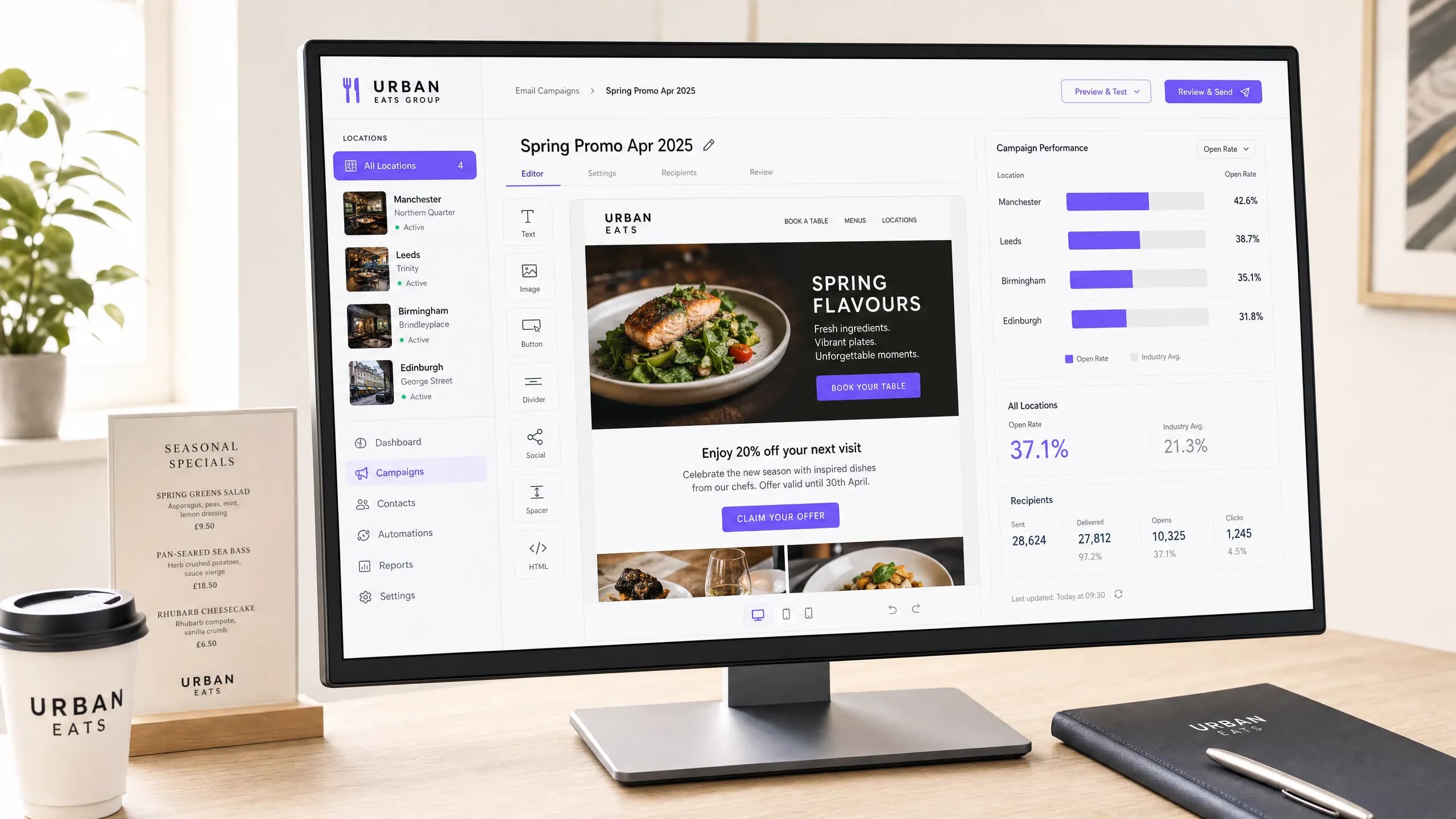
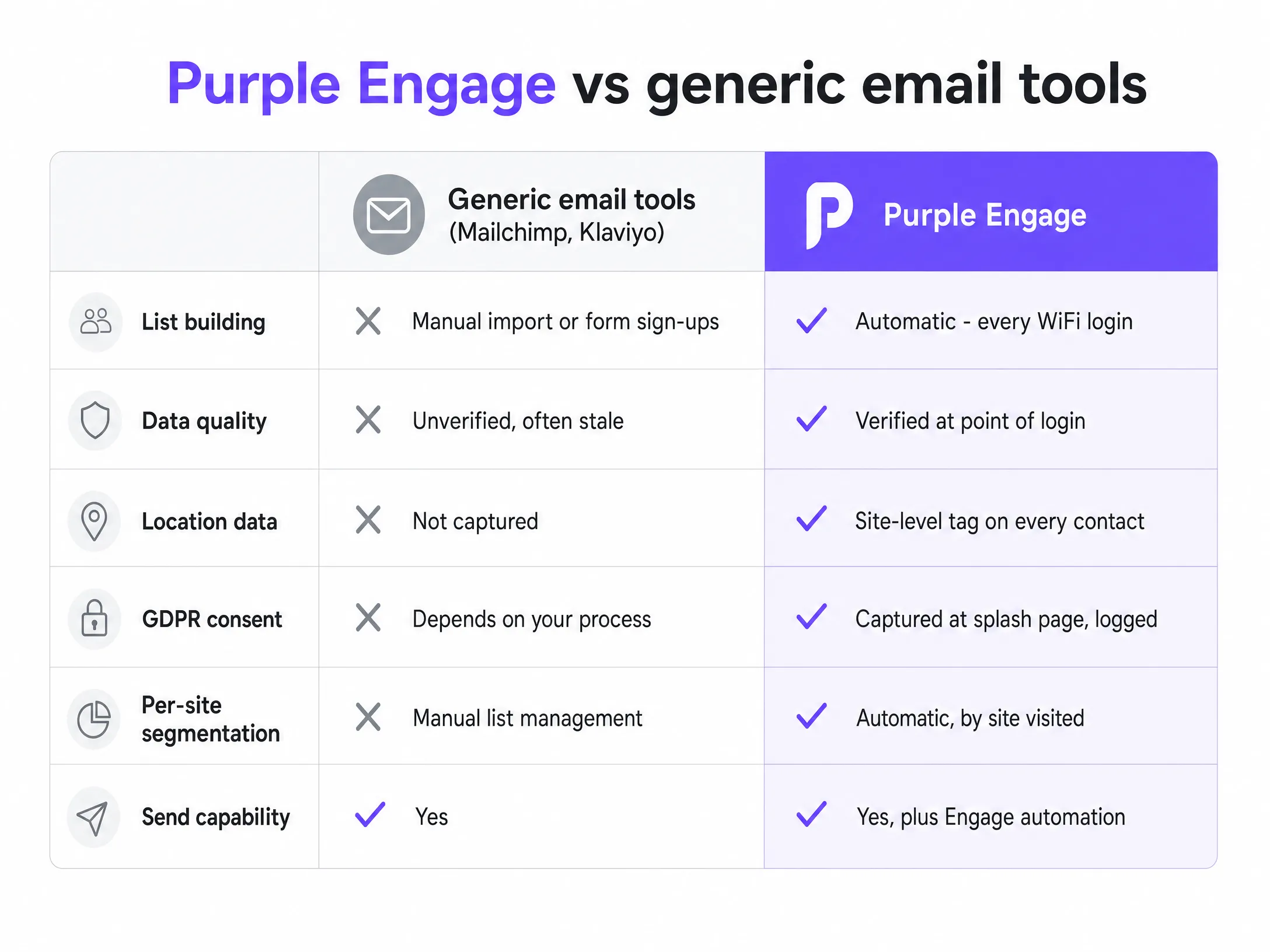
Generic email tools send campaigns effectively, but they do not build your list. They require you to import data or drive traffic to a sign-up form. Purple Engage builds the list for you, automatically, from the guests already inside your venues.
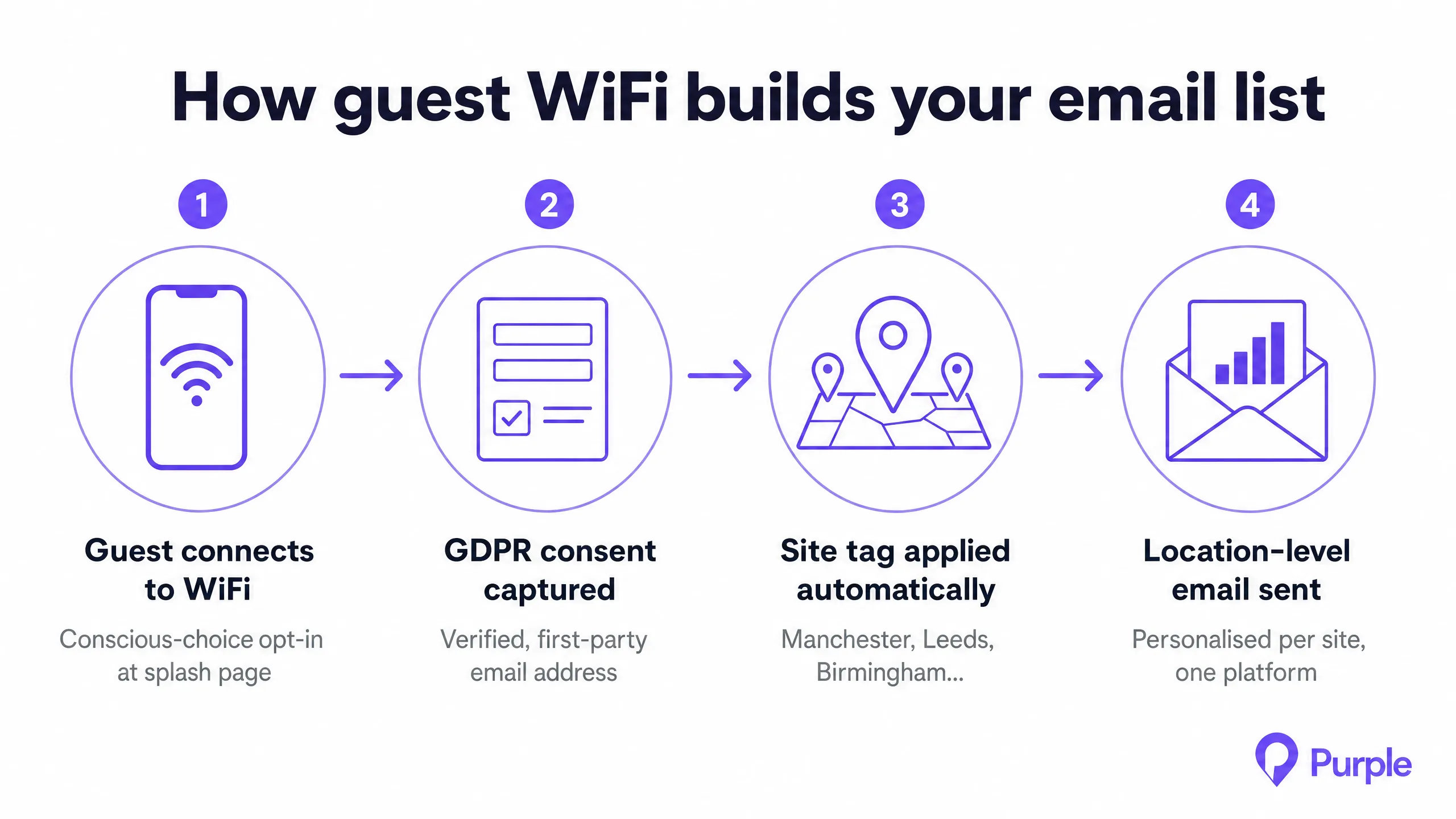
When a guest logs into your Guest WiFi, they authenticate via a captive portal - a branded web page that loads before internet access is granted. The guest provides their email address or uses a social login. They check an explicit GDPR marketing consent checkbox. Access is granted. In the background, Purple creates a verified contact record in the CRM, tagged with the specific site they visited.
This is first-party data. You own it. It cannot be taken away by a social media algorithm change or a third-party cookie deprecation. Every contact in the list made a conscious choice to share their details with your brand.
The scale this creates is significant. McDonald's Belgium deployed guest WiFi across 80 restaurants with Purple and Cisco Meraki. The network captured 2.5 million unique users in the first two years [3]. That is a marketing database built entirely from footfall, with zero manual data entry.
How Purple Engage captures the data and runs the campaign
Purple operates as a hardware-agnostic cloud overlay. Your IT team does not need to replace existing access points. Purple integrates with Cisco Meraki, HPE Aruba, Ruckus, Juniper Mist, Ubiquiti UniFi, Cambium, Extreme, and Fortinet. For groups that have grown through acquisition and inherited a mixed hardware portfolio, this matters.
The data flow works as follows. A guest enters your venue and selects the guest WiFi network. The captive portal loads. The guest enters their email address and checks the GDPR consent checkbox. Access is granted. Purple creates a contact record, logs the consent with a timestamp, and applies a location tag corresponding to the specific site. That contact is now available in Purple Engage for segmentation and campaign targeting.
PizzaExpress UAE demonstrates the commercial impact of this approach. Across 14 restaurants in the UAE, they had an outdated database of around 30,000 email addresses before Purple. Within weeks of installation, they captured an additional 10,000 unique active customers. Their first campaign - a free pizza voucher with a short expiry date - generated over 100 redemptions in a single weekend, driving incremental sales of drinks, starters, and desserts. A subsequent two-for-one campaign generated over 300 additional covers. PizzaExpress UAE found that one batch of outbound emails could increase a single day's sales by up to 4,000 Dirham [4].
What to send, and when
A consistent email program across many sites requires automation. Sending the same generic newsletter to every guest across 50 locations leads to high unsubscribe rates and low redemption. Guests in New York do not want an email about a menu launch in Los Angeles.
Segment your list by location. Purple Engage applies the location tag automatically at the point of login, so you do not need to manage this manually. Build these four core automations first.
Welcome email: Send this 24 hours after a guest's first WiFi login at any site. Thank them for visiting, introduce your brand, and optionally include a small incentive for their next visit. This is your highest-engagement email. Guests who receive a welcome email within 24 hours of their first visit are significantly more likely to return [5].
Birthday campaign: If your splash page captures date of birth, automate an email two weeks before the guest's birthday. Offer a complimentary dish or drink, valid at the site they most frequently visit. Personalised emails generate a 26% higher open rate than generic sends [6].
Win-back campaign: Trigger an email to guests who have not logged into your WiFi for 90 days. The last-seen date is captured automatically by the WiFi network. Use this to identify lapsing guests before they are lost. Offer a compelling reason to return - a new seasonal menu, a limited-time offer, or a simple message that you have missed them.
Location-specific promotions: Use the location tag to send targeted emails about local events, location-specific menu changes, or localized happy hours. A restaurant group running a pub quiz at three specific locations should email only the guests who have visited those locations, not the entire portfolio.
For timing, send promotional campaigns between 3 PM and 7 PM on Mondays or Tuesdays. Industry data shows Monday has the highest email open rate at 51.9% [7].
Measuring what works
Do not measure email success by open rates alone. The average restaurant email open rate is 43.69% [8], which is a useful benchmark, but opens do not generate revenue.
Measure the business outcome. Track offer redemptions through your POS system on the days following a campaign send. Monitor foot traffic at specific locations in the 48 hours after a location-targeted email. Calculate revenue per send by dividing the incremental revenue generated on campaign days by the number of emails sent.
The table below shows the metrics that matter, and how to capture them.
| Metric | How to capture it | What it tells you |
|---|---|---|
| Offer redemption rate | POS system, unique promo codes | Direct revenue impact of the campaign |
| Foot traffic uplift | Location-level cover count vs. same day prior week | Whether the email drove physical visits |
| Revenue per send | Incremental POS revenue divided by emails sent | The commercial value of your list |
| List growth rate | New contacts per week per location | Whether your WiFi is converting foot traffic |
| Unsubscribe rate | Email platform reporting | Whether your content is relevant to recipients |
For multi-site restaurant marketing, the most important metric is revenue per send. A list of 5,000 verified, location-tagged guests who have visited your venue will outperform a list of 50,000 unverified contacts every time.
Where to start
Follow this ordered checklist to launch your multi-location email program.
- Audit your hardware: Confirm your access points are compatible with Purple. Cisco Meraki, HPE Aruba, Ruckus, Juniper Mist, Ubiquiti UniFi, Cambium, Extreme, and Fortinet are all supported.
- Configure the captive portal: Design a clean splash page. Keep form fields to a minimum. Require an email address and an explicit, separate GDPR marketing consent checkbox.
- Set up location tags: Ensure your network hierarchy in Purple matches your physical locations. Every access point must be assigned to the correct venue so the location tag is applied accurately.
- Build the welcome automation: Draft a simple, text-focused welcome email in Purple Engage. Set it to trigger one day after a first WiFi login at any location.
- Measure list growth for 30 days: Before sending your first promotional broadcast, let the list grow. Understand your opt-in rate per location. Identify any locations where the splash page is not converting.
- Send your first location-targeted campaign: Choose one location or region. Send a relevant offer. Track redemptions at the POS. Use this as your baseline for revenue per send.
References
[1] VerifiedEmail. (2026). Email Marketing ROI Statistics. [2] Olo. (2024). Restaurant Retention Research. [3] Purple. (n.d.). McDonald's Belgium Case Study. purple.ai [4] Purple. (n.d.). PizzaExpress UAE Case Study. purple.ai [5] Stripo. (2025). Restaurant Email Marketing Statistics. stripo.email [6] Stripo. (2025). Restaurant Email Marketing Statistics. stripo.email [7] Mailerlite. (n.d.). Best Time to Send Email. mailerlite.com [8] Sender. (n.d.). Email Marketing Statistics. sender.net