
Measurement
Prove what worked, not what was opened
Where a holdout is set, Engage compares guests sent a campaign with guests held back on purpose and shows the extra share who came back, booked or bought, with a 95% range.
How does Engage measure whether a campaign worked?
Where a holdout is set, by comparing guests who were sent a campaign with guests held back on purpose. A holdout is a group deliberately not sent the campaign, used to measure what it really caused. The gap between the two groups, in percentage points, is the result: return visits and reservations over 14 days, transactions and revenue over 30. An open rate cannot tell you that.
- The extra share of guests who came back, booked or bought, against the held-back group, with gross sales shown for each group
- A 95% range on each campaign result, showing where the true effect likely sits
- A result needs 50 guests held back (5% of 1,000). Below that, the card says so in words
Where does a held-back group come from?
From your AI team's email campaigns, Meta ads, recovery journeys, journey splits and offers. The campaign builder has no holdout field of its own, so a campaign you build by hand carries no held-back group. Ask your AI team to stage it and 5% is held back.
- Email campaigns your AI team stages: 5% held back
- Meta ads aimed at a list: 10% by default, from 0 to 50%
- Recovery journeys: up to 50%
- A journey split path wired to the end
- Offers: 0 to 20%, set through the API
Why do my open rates look different in Engage?
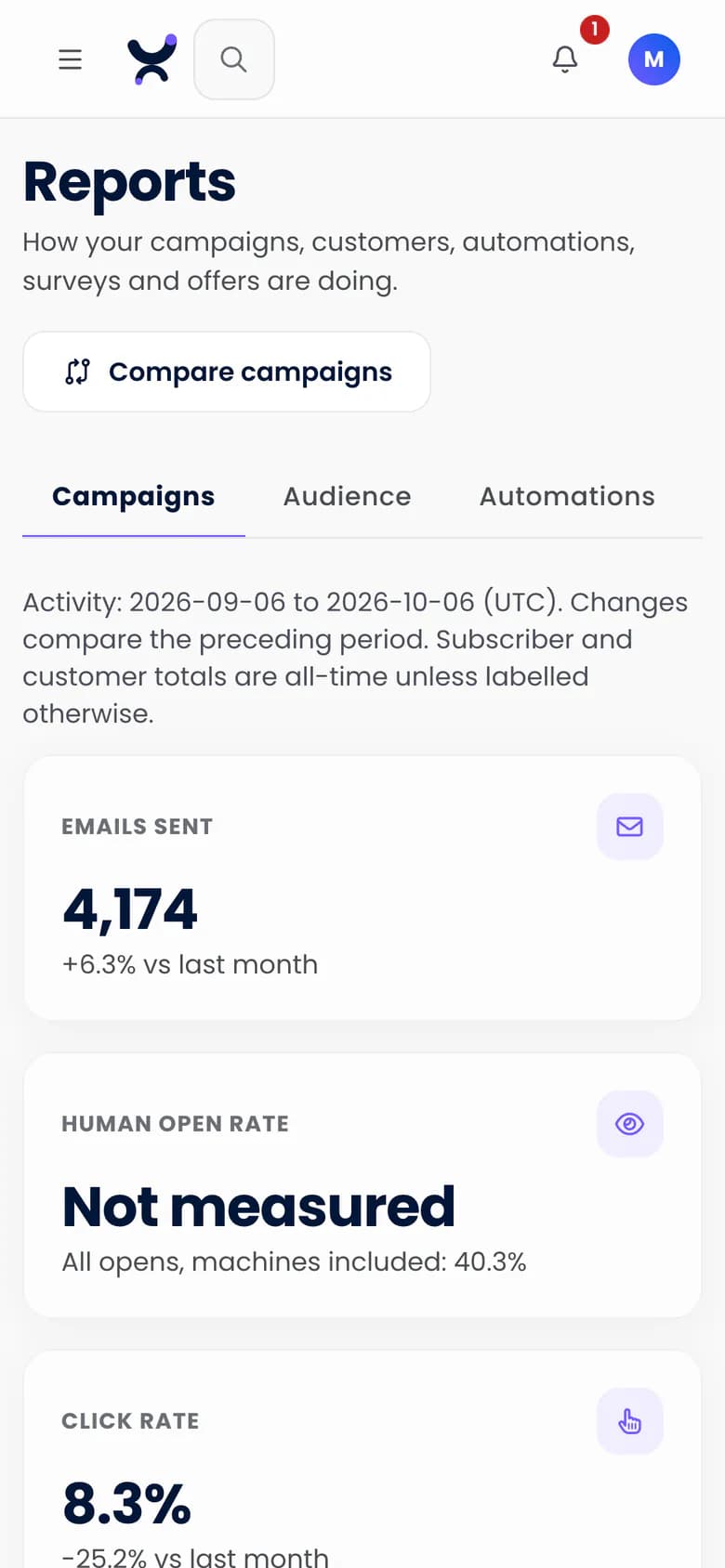
Because Engage counts people before machines. Apple Mail Privacy Protection fetches every image, so those opens are machines, and link scanners click links. Engage shows human opens first with machine opens beside them, and where opens cannot be measured it shows "not measured", never 0%. Anything it cannot tell apart counts as a person, so the human figure can lean high, never low.
- Human opens first, machine opens beside them, raw figures beneath
- "Not measured" shown instead of 0%
- A click counts as an open, so guests who block images are not called non-openers
Can I see where guests clicked in an email?
Yes. A badge on each tracked link shows its clicks and its share of all clicks, with one map per A/B version. Clicks that cannot be matched to a link are shown as a number, never guessed onto one.
- Clicks and share of clicks on each tracked link
Can I compare campaigns with each other?
Yes. Put two to six sent campaigns side by side on delivery, bounces, human opens, clicks, unsubscribes and complaints, each cell with its counts. A campaign is marked best only when its 95% range overlaps no other's; otherwise the leaders read "similar".
- Compare two to six campaigns, each with a 95% range
How does Engage decide an A/B test winner?
It reads the test samples on human opens or clicks. It says "B is ahead, and the gap is unlikely to be chance" only when the 95% range on the difference clears zero; otherwise it says "Too close to call". You can test the subject line, the sender or the whole email.
- "Too close to call" unless the 95% range on the difference clears zero
- Tests on the subject line, the sender or the whole email, with two to four versions
- The automatic rule still sends the leader to the rest of the list, so pick the winner yourself for a close test
How are ads, offers, surveys and takings measured?
Each has its own reading, labelled for what it is. Meta's own figures are never added to Engage's measured ones, and currencies are never combined.
- Meta ads, a pilot Purple sets up with you: extra visits against the held-back group, with a range, once enough guests are held back, otherwise "not measured yet". Meta's own figures sit in a labelled section and are never added in
- Offers: issued, redeemed and cost against budget, and, where a holdout is set, return visits as a single estimate
- Surveys: a response funnel, an NPS panel with a weekly trend, and verbatims
- Takings: gross sales in each currency, refunds not subtracted, and "partial" where a sale has no amount
Can I get the numbers out?
Yes. Copy your data to your own warehouse on a schedule, read reports through the public API, or take a live feed of events by webhook.
- Contacts, activities, transactions, reservations and stays to your own BigQuery, Snowflake or Amazon S3, hourly, every six hours or daily, set up with the Purple team
- The public API reads a campaign's report with the human split, and signed webhooks send events as they happen
Questions
What is a held-back group?
A share of the guests a campaign targets who do not receive it. Comparing them with the guests who did shows what the campaign changed.
Why does Engage show "not measured" instead of 0%?
Because 0% would say nobody opened. When a rate cannot be measured, for example for a campaign sent before Engage began separating human opens from machine opens, or when nothing was delivered, Engage says so.
What if my list is too small?
Engage says "not measured yet" instead of a figure that flatters. A campaign result needs 50 guests held back, which is 5% of a list of 1,000, and ads need a larger list, set out on the Ads page. Because the headline counts people, open rates also look lower than in tools that count machines.
Does Engage report till revenue from campaigns?
Yes, from connected tills. Where a holdout is set, a campaign's results show gross sales in each currency for the guests sent and the guests held back, beside the extra share who came back. Refunds arrive after the window closes, so they are not subtracted, and a voided order is never counted.
See which campaigns brought guests back
The free plan is listed at 500 credits a month, with unlimited* contacts and no card needed.