
Grow a first-party email list without discounting your margin
This guide shows how physical venues can build a high-quality, GDPR-compliant email list using guest WiFi, eliminating the need for margin-eroding discounts.
Video overview
Listen to this guide
Read the transcript
Welcome to the Purple Engage briefing. Today, we are looking at a problem that costs hospitality and retail venues thousands of pounds in lost margin every single month: the discount dependency trap when building an email list. I am going to walk you through how to grow a first-party email list without discounting your margin, using your existing guest WiFi. This is a practical guide. No theory. No fluff. By the end of this briefing, you will have a clear picture of what to do, in what order, and how to measure whether it is working. Let's start with why this matters. If you are a marketing director or a venue operator, you know the drill. You want to build a database to drive repeat visits. So, you put a popup on your website or a QR code on the tables offering ten percent off the bill in exchange for an email address. Here is the problem. You are training your guests to wait for a coupon. You are taking your most loyal customers, the ones sitting in your venue ready to pay full price, and you are actively eroding your profit margin on their visit. And what do you get in return? Often, a secondary or fake email address from someone who just wanted the cheap starter and will never open your emails again. The discount dependency trap is insidious because it looks like it is working. Your list grows. Your CRM fills up. But the open rates are low, the click rates are lower, and when you look at the cohort data, the guests you acquired through discounts have a significantly lower lifetime value than guests who found you organically. There is a better way. You trade access, not margin. Now let's get into the approach. The core mechanism is simple. You use your guest WiFi as the capture tool. When a guest wants to get online, they connect to your network and land on a branded splash page. To get access, they provide their email address and actively opt in to marketing communications. The guest gets what they need in that moment, internet access. You get what you need, a verified, legally compliant first-party data profile. No discounts required. Let's look at the numbers. A well-optimised website popup might convert at three or four percent. Guest WiFi login? We consistently see opt-in rates of up to fifty percent across our network of eighty thousand plus live venues. That is not a marginal improvement. That is a completely different league. And because you are using Purple Engage, the list builds itself. Generic email tools like Mailchimp are excellent for sending campaigns, but they do not build the list for you. Purple sits as a hardware-agnostic cloud overlay on your existing network hardware, whether that is Cisco Meraki, HPE Aruba, Ruckus, or Ubiquiti UniFi, and quietly captures first-party data twenty-four hours a day. Pizza Express is a useful example here. They used this exact integration to capture three point seven million unique users in their CRM in just two years. That is a list built from real visits, not from discount hunters. And Harrods used the same conscious-choice opt-in model to promote their loyalty scheme and achieved a fifty-seven times return on investment from their Guest WiFi programme. Now, how do you actually execute this? Let me walk you through the practical steps. First, keep the splash page clean. Ask for a first name and an email address. Do not ask for their date of birth or their postcode at this stage. Friction kills conversion. The longer the form, the fewer people complete it. We have seen venues try to collect six fields on the splash page and watch their opt-in rate drop to single digits. Two fields. That is the rule. Second, make the opt-in a conscious choice. This is not just good practice, it is a GDPR requirement. Use an unchecked checkbox for marketing consent. The guest must actively tick it. This is what we call a conscious-choice opt-in, and it is the foundation of a healthy, engaged list. A pre-ticked box does not constitute valid consent under GDPR, and it also produces a worse list because the guest did not make an active decision. Third, automate the follow-up based on context. This is where the real power lies. Because the data comes from the WiFi network, you know exactly when a guest is in the building and when they leave. Use that information to time your communications. Trigger a welcome email thirty minutes after a first-time guest logs in. Welcome them to the venue. Highlight a signature dish, an upcoming event, or your loyalty programme. Do not include a discount. The relationship starts with value, not price. Think about what you would say to a guest if you were standing at the door as they left. That is the tone. Send a review request two hours after they disconnect from the network. The experience is fresh in their mind, and conversion rates on review requests are significantly higher at that point than they are the following morning. This single automation, a review request sent two hours after a visit, can meaningfully improve your Google and TripAdvisor ratings within the first month of deployment. For lapsed guests, those who visited regularly but have not been back in thirty days, send a targeted re-engagement email. This is the one scenario where a specific offer might be appropriate, because you are actively trying to win back someone who has drifted. But even here, lead with the experience. Tell them what is new. Tell them what they have been missing. The offer, if you include one, should be secondary. For your most frequent guests, those who have visited five times or more, send a loyalty programme invitation on their fifth visit. These are your most valuable customers. Bring them into a formal loyalty structure so you can reward and retain them. Now let me address the pitfalls, because there are a few. The biggest mistake operators make is panicking in week one. When you remove the discount from the sign-up process, you might see a slight dip in raw email volume initially. Hold your nerve. The quality of the list you are building via WiFi is vastly superior. You are capturing real people who are actually in your venue, and you are not subsidising their visit to do it. The second pitfall is over-asking on the splash page. I have seen venues try to collect email, mobile number, date of birth, and home address all in one go. The abandonment rate is brutal. Start with the minimum viable data set. You can progressively profile your guests over time through targeted email campaigns that ask for more information in exchange for specific value. The third pitfall is treating the WiFi list like any other email list. It is not. These are people who have physically visited your venue. They have a real-world relationship with your brand. Segment them by visit frequency, by location if you operate multiple sites, and by the time of day they typically visit. A guest who comes in every Thursday lunchtime is a completely different segment from a Saturday evening first-timer. Your messaging should reflect that. The fourth pitfall is measuring the wrong things. If you are reporting to your board on email open rates, you are measuring the wrong metric. The metric that matters for a physical venue is return visits and revenue per send. Purple Engage gives you both. Let me take a couple of questions that come up regularly. Question one: My IT team is worried that a captive portal will generate helpdesk tickets from guests who cannot connect. How do I address that? The answer is to implement social login options alongside standard email entry. When a guest can authenticate with their Google or Microsoft account, the process takes under ten seconds and requires no typing. It also provides a verified email address automatically, which reduces bounce rates on your campaigns. The vast majority of guests have a Google or Microsoft account on their phone. Social login removes the most common failure points: forgotten passwords and mistyped email addresses. Question two: Can I use this data to measure whether my emails are actually driving people back into the venue? Yes, and this is one of the most powerful features of the Purple Engage platform. Because Purple tracks devices when they return to the network, you can measure the offline impact of your online campaigns. If you send an email promoting a new menu to five thousand subscribers, Purple Engage can tell you exactly how many of those recipients walked back through your doors in the following seven days. That is a metric that Mailchimp, Klaviyo, and HubSpot simply cannot provide on their own. It closes the loop between your email activity and your physical revenue. Question three: We operate across forty sites with different hardware. Is this still feasible? Yes. Purple is hardware-agnostic. It integrates with Cisco Meraki, HPE Aruba, Ruckus, Juniper Mist, Ubiquiti UniFi, Cambium, Extreme, and Fortinet. You can deploy it as a cloud overlay across a mixed estate without replacing any existing access points. The data flows into a single dashboard regardless of which hardware is running at each site. Let me wrap up with the key takeaways. Stop trading margin for email addresses. Your guest WiFi is already providing a utility that guests want. Use that as the value exchange. Keep the sign-up process minimal. First name and email address. Conscious-choice opt-in. GDPR compliant from day one. Automate based on context. Welcome emails, review requests, and re-engagement campaigns should all be triggered by what the guest actually does in your venue, not by a generic broadcast schedule. Measure offline impact. Track return visits and revenue per send, not just open rates and click-through rates. And finally, compare the lifetime value of a WiFi-acquired guest against a discount-acquired guest after ninety days. The data will make the case for you. If you want to see how Purple Engage works across your specific hardware estate, visit purple dot ai. Thanks for listening.
Why this matters for your venue
Building an email list usually means sacrificing margin. Most venues trade a 10% discount or a free starter for an email address, which trains guests to wait for a coupon before visiting. That erodes profit on your most loyal customers and attracts people who only want the initial reward and use throwaway email addresses.
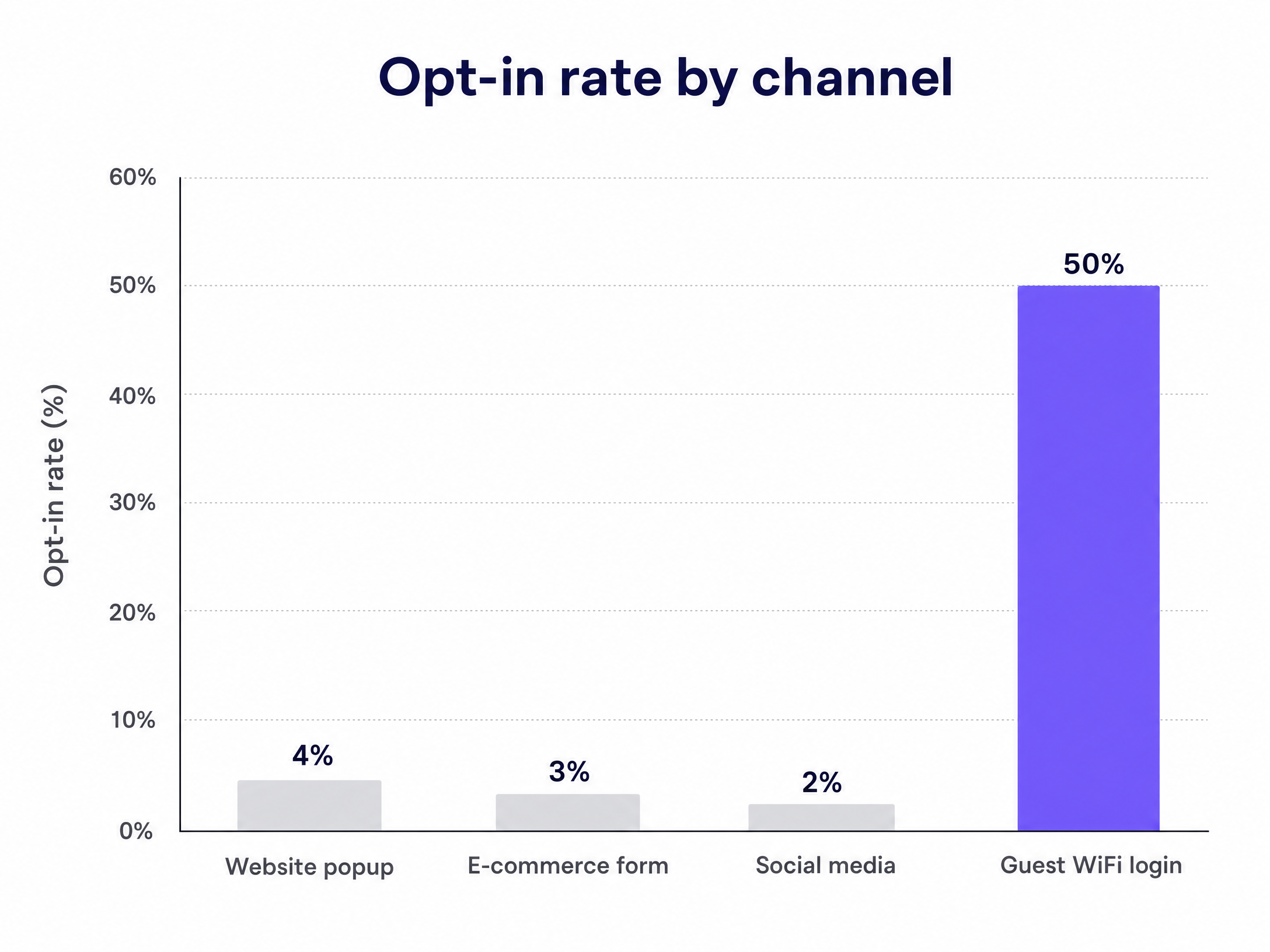
First-party data capture through Guest WiFi changes this. You trade internet access for a verified, voluntary opt-in. The guest gets what they need in the moment, and you build a database of conscious-choice subscribers without giving away margin. Based on Purple's data across more than 80,000 live venues, Guest WiFi logins deliver opt-in rates of up to 50%, while website popups average just 2% to 5% (Purple, 2024).
A list built this way reflects your actual footfall. When you use Purple Engage, the list builds itself automatically around the clock, capturing the people who are already inside your venue. Generic tools like Mailchimp, Klaviyo and HubSpot send the campaigns, but they do not build the list.
The approach
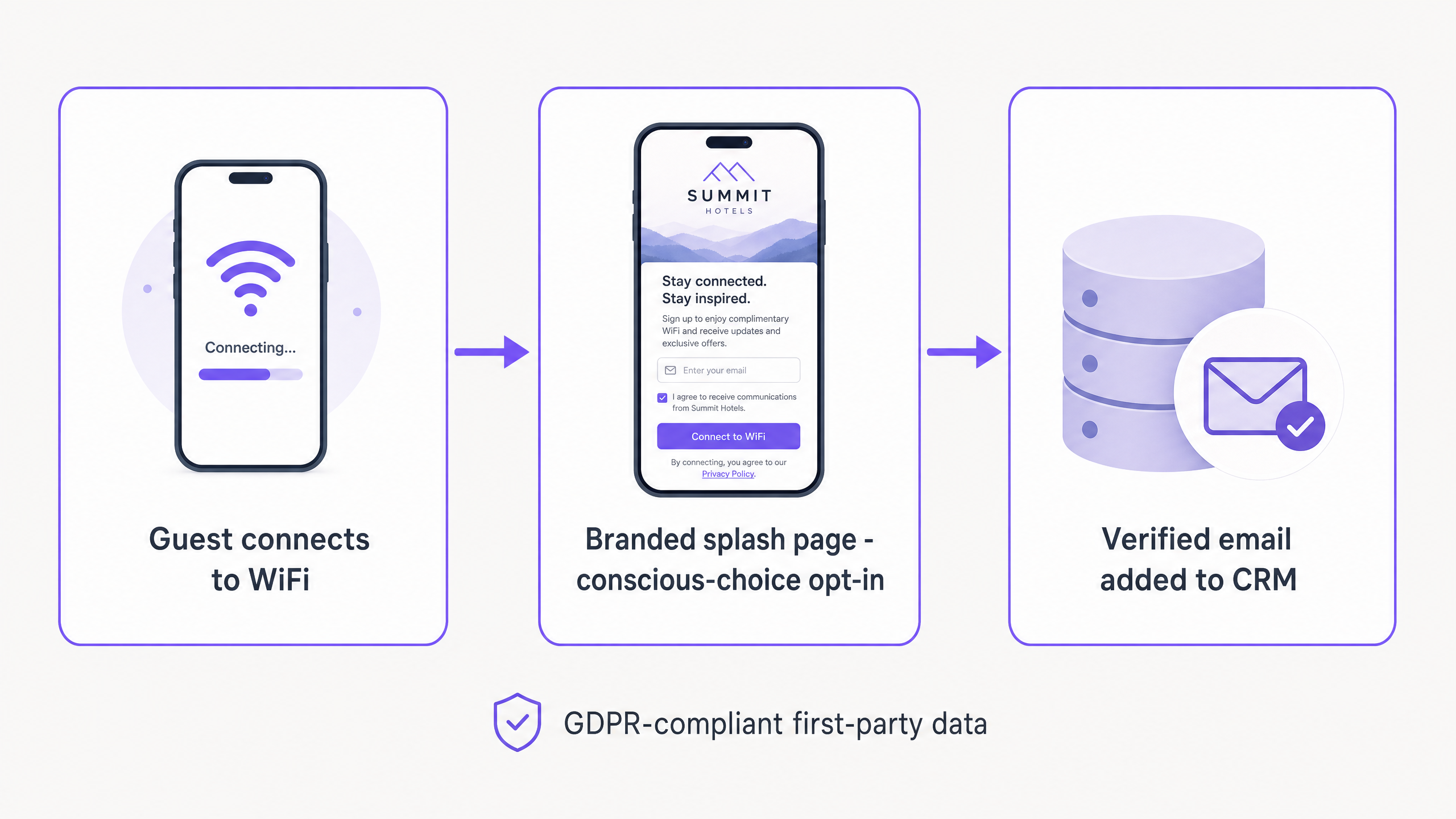
The mechanism is the captive portal - a branded web page that guests must interact with before accessing your WiFi network. A guest connects to your Guest WiFi SSID, is redirected to a login page, and authenticates with their email address or a social account. That authentication verifies identity, reduces bounce rates, and captures a first-party data profile in a single step.
The key difference between this and discount-based sign-ups is motivation. A guest on a captive portal wants internet access. They are already in your venue, already engaging with your brand. The WiFi is the value exchange. You do not need to sweeten the deal with money off the bill.
Pizza Express used this integration to capture 3.7 million unique users in their CRM within two years (Purple, 2024). Harrods achieved a 57x return on investment from their Guest WiFi programme by using the same conscious-choice opt-in model to promote their loyalty scheme (Purple, 2024).
For more on how this applies specifically to retail environments, see Turning retail footfall into an email list.
How to do this with your Guest WiFi
Purple operates as a hardware-agnostic cloud overlay, integrating with Cisco Meraki, HPE Aruba, Ruckus, Juniper Mist, Ubiquiti UniFi, Cambium, Extreme and Fortinet. You can deploy it without replacing your existing hardware.
Step 1 - Configure the network. Set up a dedicated Guest WiFi SSID, isolated from your corporate network. This is standard practice and keeps your business systems separated from public traffic.
Step 2 - Design the splash page. Build a branded login portal. Keep the design clean and the data requirements minimal. Ask for a first name and an email address. Do not ask for a date of birth or a street address at this stage.
Step 3 - Set up the consent terms. Present your privacy policy clearly and use an unchecked checkbox to capture marketing consent. The guest must actively tick it. This is a GDPR requirement and the definition of a conscious-choice opt-in. Purple is fully GDPR, CCPA and ISO 27001 compliant.
Step 4 - Connect your CRM. Integrate Purple Engage with your existing CRM or marketing automation platform to sync new profiles automatically. Purple's average cost per lead across its network is £0.28 (Purple, 2024), and email verification at the point of capture improves database accuracy by 83% (Purple, 2024).
Step 5 - Activate and monitor. Once live, the system runs silently. During the first month, track opt-in rate, list growth and email verification rate weekly.
What to send, and when
The value of a Guest WiFi list lies in the context it provides. You know when a guest is inside your venue and when they leave. Use that to automate your communications.
| Trigger | When to send | Email content | Goal |
|---|---|---|---|
| First WiFi login | 30 minutes after login | Welcome email highlighting venue specialities or events | Build the relationship |
| Network disconnect | 2 hours after leaving | Review request (Google, TripAdvisor) | Capture social proof |
| No visit within 30 days | Day 30 of no visit | Re-engagement email | Win back lapsed guests |
| Repeat visit (5th+) | 1 hour after login | Loyalty programme invitation | Increase customer lifetime value |
The welcome email is the most important send. It sets the tone for the relationship. Do not include a discount. Highlight something distinctive about your venue - a signature dish, an upcoming event, or a new menu. You are building a relationship based on experience, not price.
The re-engagement email is the only scenario where a targeted offer makes sense. You are trying to win back a guest who has already lapsed. Even then, lead with the experience. For long-term list health, "we have launched a new menu" performs better than "here is 10% off".
Measuring success
Open rates and click rates only tell part of the story. For a physical venue, the real measure of email marketing is return visit rate and revenue per send.
Because Purple tracks devices when they re-enter the venue, you can measure the offline impact of online campaigns. If you send an email promoting a Tuesday-night event to 5,000 subscribers, Purple Engage can tell you exactly how many of those recipients walked through your door on Tuesday evening. Mailchimp, Klaviyo and HubSpot cannot do this on their own.
Track these four metrics:
- Opt-in rate - the percentage of WiFi logins that produce a marketing opt-in. Target: 40% or above.
- List growth rate - new verified emails added per week. Benchmark against your weekly footfall.
- Revenue per send - total revenue attributable to a campaign divided by the number of emails sent.
- Return visit rate - the percentage of guests who physically return within 14 days of receiving an email.
After 90 days, compare the lifetime value of WiFi-acquired guests against guests acquired through discount codes. The WiFi cohort consistently shows higher long-term value because their relationship with your brand is not predicated on price.
Where to start
- Audit your hardware. Confirm your access points are on the supported list (Cisco Meraki, HPE Aruba, Ruckus, Juniper Mist, Ubiquiti UniFi, Cambium, Extreme, Fortinet).
- Review your current splash page. Is it branded? Is the consent checkbox unchecked by default? Does it ask for more than two fields?
- Plan your automations. Draft the welcome email and the review request before going live.
- Set your baseline. Record your current opt-in rate, list size and weekly footfall so you can measure the impact.
- Launch and monitor. Deploy the new splash page and track opt-in rate, list growth and return visit rate weekly for the first 30 days.