
WiFi marketing for retail: turn footfall into a customer list
This guide explains how retail venues can use their existing guest WiFi to capture first-party data and build a GDPR-compliant customer list. It covers the business case, the technical setup, and practical strategies for using this data to drive repeat visits and revenue.
Video overview
Listen to this guide
Read the transcript
WiFi Marketing for Retail: Turn Footfall into a Customer List A Purple Engage Marketing Briefing - Full Podcast Script Approximate runtime: 10 minutes --- INTRO Hello, and welcome to the Purple Engage marketing briefing. I'm your host, and today we're talking about one of the most underused assets sitting in your retail store right now - your guest WiFi. If you're a marketing director, a CRM manager, or you run your own retail venue, this episode is for you. By the end of the next ten minutes, you'll understand exactly how to turn the shoppers walking through your door into a consented, verified email list - and how to activate that list to drive repeat visits and measurable revenue. Let's get into it. --- SECTION ONE: WHY THIS MATTERS - ONE MINUTE Here's the problem most retailers face. You get footfall. Shoppers come in, browse, maybe buy, and leave. And you have no idea who they are. You can't reach them again. You can't tell them about a new collection, a sale, or an event. They're gone. The average retail website popup converts at somewhere between two and five percent. That means ninety-five out of every hundred people who visit your website leave without giving you their contact details. And that's your website - people who actively sought you out. In your physical store, the situation is often worse. You might have a loyalty card scheme, but sign-up rates at the till are low. Staff forget to ask. Shoppers are in a hurry. Meanwhile, your guest WiFi is sitting there, switched on, doing nothing except giving people internet access. That is a missed opportunity. Here's the number that changes the conversation: WiFi marketing delivers opt-in rates of forty to sixty percent. That is eight to twelve times higher than a website popup. The reason is simple - there's a clear value exchange. The shopper wants the WiFi. You want their email address and marketing consent. Both parties get what they need, in about thirty seconds, at the exact moment the shopper is in your store. That is the business case. Now let's talk about how it actually works. --- SECTION TWO: THE APPROACH - FIVE MINUTES The mechanism is a captive portal - sometimes called a splash page. When a shopper connects to your guest WiFi, instead of going straight online, they land on a branded page. That page presents your store branding, a short form asking for their name and email address, and a clear, unticked marketing consent checkbox. The shopper ticks the box, hits connect, and gets their WiFi. You get a verified, consented contact record that flows directly into your CRM. Now, this is where the distinction between a WiFi marketing platform and a generic email tool matters enormously. Mailchimp is excellent at sending campaigns. Klaviyo is excellent at segmentation and automation. HubSpot is excellent at CRM. But none of them build your list from physical footfall. They all assume you already have the contacts. The question is: where do those contacts come from? With Purple Engage, the list builds itself. Every time a shopper connects to your guest WiFi, a new record is created - or an existing record is updated with a new visit. You get their email, their name, and behavioural data: how often they visit, how long they stay, which part of the store they spend time in. All of it is captured automatically, in the background, without any manual effort from your team. And because the consent is captured at the captive portal - with a timestamp, an opt-in source, and a record of exactly what the shopper agreed to - it is fully compliant with GDPR. Under GDPR, consent for direct marketing must be freely given, specific, informed, and unambiguous. A clearly worded, unticked checkbox on a branded splash page meets all four criteria. You own the data. Purple acts as the data processor. You remain the data controller. Let me give you a real-world example. Harrods, one of the world's most recognisable luxury retailers, used Purple's guest WiFi to drive over four thousand four hundred sign-ups through WiFi alone. Those weren't cold contacts bought from a list. They were verified shoppers who had physically walked into the store and chosen to opt in. Here's another one. McDonald's Belgium used Purple to collect over two and a half million unique visitor records across their estate. That scale of first-party data collection - verified, consented, tied to physical visit behaviour - is simply not achievable through website forms or social media lead ads. Now, the data you capture through guest WiFi is qualitatively different from data you might buy or scrape. It is first-party data - collected directly from the shopper, with their knowledge and consent. It is verified, because the email address is confirmed at sign-in. And it is contextual - you know this person was physically in your store, on a specific date, for a specific length of time. That context makes your marketing far more relevant. Compare that to a purchased list, where you have no idea whether the contact has ever heard of your brand, let alone visited your store. Or compare it to a retargeting pixel on your website, which captures anonymous intent but not identity. Guest WiFi gives you identity, consent, and physical presence data in a single event. Purple Engage integrates with over four hundred connectors, including Salesforce, HubSpot, Mailchimp, Microsoft Dynamics 365, and many more. The moment a shopper opts in, their record can flow into your existing CRM or email platform automatically. You don't need to export CSV files or manually import contacts. The pipeline is live. --- SECTION THREE: PRACTICAL STEPS AND PITFALLS - TWO MINUTES Let me walk you through the practical steps to get this working. Step one: audit your existing hardware. Purple works as a cloud overlay on top of access points from Cisco Meraki, HPE Aruba, Ruckus, Juniper Mist, Ubiquiti UniFi, Cambium, Extreme, and Fortinet. In most cases, you don't need to replace your existing network infrastructure. You add Purple on top. Step two: design your splash page. Keep it simple. Your brand, a short value proposition - something like "Stay connected. Get exclusive offers" - a name and email field, and a clear consent checkbox. The checkbox must be unticked by default. That is a GDPR requirement, not a suggestion. Step three: connect your CRM. Map the fields from the splash page form to your CRM contact record. Set up a welcome email to fire automatically when a new contact is created. That welcome email should arrive within minutes of the shopper connecting. They're still in your store. That is the highest-intent moment you will ever have with that contact. Step four: build your segments. Once you have three to six months of data, you can segment by visit frequency - first-time visitors, regulars, lapsed shoppers who haven't been in for sixty or ninety days. Each segment gets different messaging. A first-time visitor gets a welcome offer. A regular gets early access to new arrivals. A lapsed shopper gets a win-back campaign. Now, the pitfalls. The most common mistake is treating the WiFi opt-in list like a broadcast channel. Sending the same email to every contact, every week, regardless of their behaviour, will kill your deliverability and your unsubscribe rate. Segment from day one. The second pitfall is neglecting the welcome email. Contacts are most engaged in the first twenty-four hours after sign-up. If your first email arrives three days later, you've already lost the moment. The third pitfall is poor splash page design. A cluttered, off-brand splash page reduces opt-in rates. Keep it clean, keep it fast to load, and make the value exchange obvious. --- SECTION FOUR: QUICK Q AND A - ONE MINUTE A few questions I hear regularly. "Can I use this data for SMS as well as email?" Yes. You can add a mobile number field to your splash page and capture SMS consent separately. GDPR requires separate consent for each channel, so make sure your form has distinct checkboxes for email and SMS. "What if a shopper has already connected before?" Purple recognises returning devices and returning email addresses. You can configure the portal to skip the form for returning visitors, or to show a lighter-touch re-engagement prompt. Their visit data still updates automatically. "How does this compare to a loyalty app?" A loyalty app requires the shopper to download it, create an account, and remember to open it. Guest WiFi requires none of that. The opt-in happens at the moment of connection, with zero friction. The two are complementary - you can use the WiFi opt-in to drive loyalty app downloads as a secondary call to action on the splash page. --- SECTION FIVE: SUMMARY AND NEXT STEPS - ONE MINUTE Let me bring this together. Your guest WiFi is a first-party data asset. Every shopper who connects is a potential contact. The opt-in rate - forty to sixty percent - is eight to twelve times higher than a website popup. The data is verified, consented, and contextual. It flows directly into your CRM. And the list builds itself, automatically, every day your store is open. Mailchimp, Klaviyo, and HubSpot are great tools for sending campaigns. But they don't build the list. Purple Engage does both - it captures the data from the WiFi login and activates it through your email and CRM workflows. The starting point is simple. Audit your existing access points, get a Purple Engage demo, and design your splash page. Within thirty days, you can have a live, growing, GDPR-compliant email list built entirely from your own footfall. If you want to go deeper, we've published a full written guide - WiFi marketing for retail: turn footfall into a customer list - on the Purple website. There's also a companion guide on building an email list from WiFi without buying one, which covers segmentation and automation in more detail. Thanks for listening. I'll see you in the next briefing. --- END OF SCRIPT
Why this matters for your venue
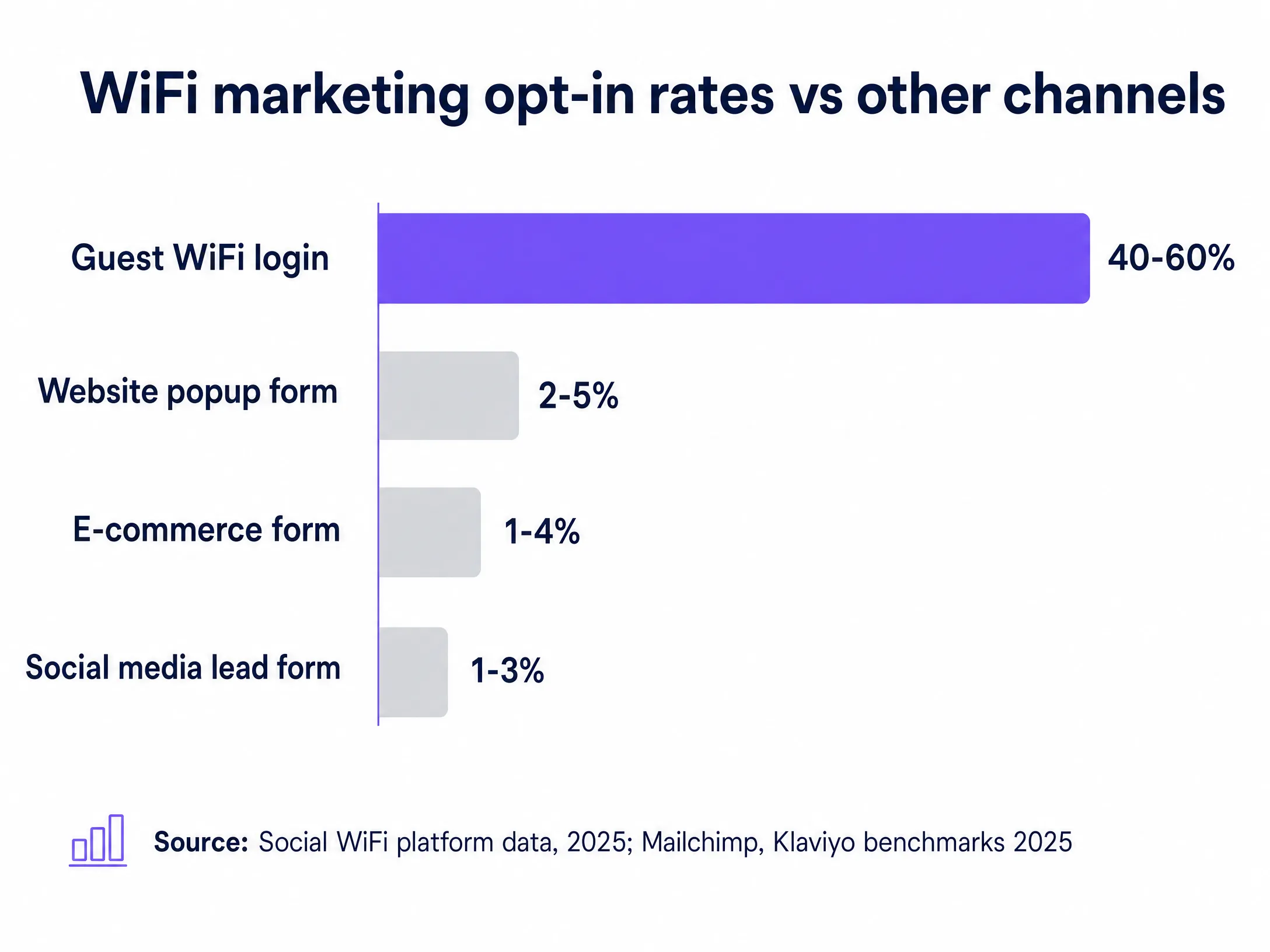
You get footfall. Shoppers come in, browse, buy, and leave. If you do not capture their details, you have no way to reach them again. The average retail website popup converts at between 2% and 5%. That means 95 out of every 100 people who visit your website leave without giving you their contact details. In your physical store, the situation is often worse. You might have a loyalty scheme, but sign-up rates at the till are low. Staff forget to ask. Shoppers are in a hurry.
Meanwhile, your guest WiFi is sitting there, switched on, doing nothing except giving people internet access. This is a missed opportunity. WiFi marketing delivers opt-in rates of 40% to 60%. That is 8 to 12 times higher than a website popup. The reason is simple. There is a clear value exchange. The shopper wants the WiFi. You want their email address and marketing consent. Both parties get what they need, in about 30 seconds, at the exact moment the shopper is in your store.
The approach
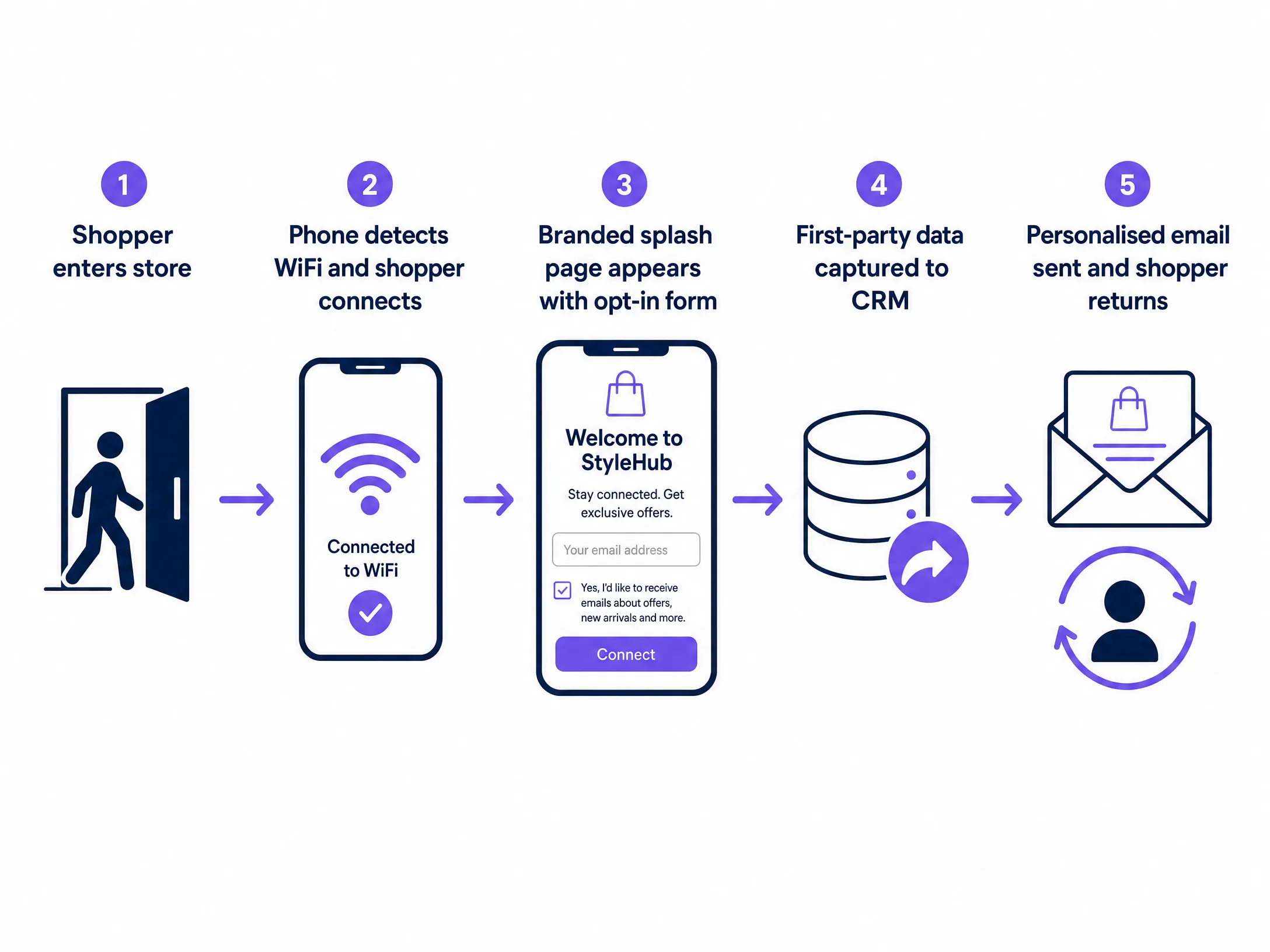
The mechanism is a captive portal. When a shopper connects to your guest WiFi, instead of going straight online, they land on a branded page. That page presents your store branding, a short form asking for their name and email address, and a clear, unticked marketing consent checkbox. The shopper ticks the box, hits connect, and gets their WiFi. You get a verified, consented contact record that flows directly into your CRM.
This is where the distinction between a WiFi marketing platform and a generic email tool matters. Mailchimp is excellent at sending campaigns. Klaviyo is excellent at segmentation and automation. HubSpot is excellent at CRM. But none of them build your list from physical footfall. They all assume you already have the contacts. With Purple Engage, the list builds itself. Every time a shopper connects to your Guest WiFi, a new record is created or an existing record is updated with a new visit.
How to do it with your guest WiFi
Because the consent is captured at the captive portal with a timestamp, an opt-in source, and a record of exactly what the shopper agreed to, it is fully compliant with GDPR. Under GDPR, consent for direct marketing must be freely given, specific, informed, and unambiguous. A clearly worded, unticked checkbox on a branded splash page meets all four criteria. You own the data. Purple acts as the data processor. You remain the data controller.
Consider Harrods. They used Purple's guest WiFi to drive over 4,400 sign-ups through WiFi alone. Those were verified shoppers who had physically walked into the store and chosen to opt in. McDonald's Belgium used Purple to collect over 2.5 million unique visitor records across their estate. That scale of first-party data collection is simply not achievable through website forms or social media lead ads.
What to send, and when
Purple Engage integrates with over 400 connectors, including Salesforce, HubSpot, Mailchimp, and Microsoft Dynamics 365. The moment a shopper opts in, their record flows into your existing CRM automatically.
Once you have the data, you need to use it. The most common mistake is treating the WiFi opt-in list like a broadcast channel. Sending the same email to every contact, every week, regardless of their behaviour, will ruin your deliverability. You must segment. Once you have three to six months of data, you can segment by visit frequency. A first-time visitor gets a welcome offer. A regular gets early access to new arrivals. A lapsed shopper gets a win-back campaign. Set up a welcome email to fire automatically when a new contact is created. That welcome email should arrive within minutes of the shopper connecting. They are still in your store. That is the highest-intent moment you will ever have with that contact.
Measuring what works
Purple tracks WiFi sign-ins before and after campaigns and correlates them with repeat visit frequency and dwell time. Campaign-level reporting in Purple Hub shows open rate, click rate, and uplift in footfall attributed to each email or SMS send, giving you a direct line from WiFi data to revenue impact.
Where to start
- Audit your existing hardware. Purple works as a cloud overlay on top of access points from Cisco Meraki, HPE Aruba, Ruckus, Juniper Mist, Ubiquiti UniFi, Cambium, Extreme, and Fortinet.
- Design your splash page. Keep it simple. Your brand, a short value proposition, a name and email field, and a clear consent checkbox.
- Connect your CRM. Map the fields from the splash page form to your CRM contact record.
- Set up a welcome email. Fire it automatically when a new contact is created.
For more on this topic, read Email marketing for restaurants: a practical guide and How to build an email list from your WiFi (without buying one).