
Using dwell time and visit data to segment venue guests
This guide shows marketing directors and CRM managers how to build behavioural segments from dwell time and visit frequency data captured through guest WiFi. It covers the full workflow from WiFi login to automated campaign, with worked examples from hospitality and retail.
Video overview
Listen to this guide
Read the transcript
Welcome to the Purple Engage strategy briefing. I'm your host, and today we're looking at one of the most underused signals in venue marketing: dwell time and visit frequency. If you're a marketing director or CRM manager at a restaurant, hotel, bar, or retail venue, this one is for you. Let's start with why this matters. Most venues are sitting on a goldmine of behavioural data and not using it. When a guest walks through your door, connects to your WiFi, and spends two hours at a table, that's a signal. When the same guest comes back every Tuesday, that's another signal. And when a regular suddenly stops showing up for 30 days, that's the most important signal of all. The problem is that generic email tools like Mailchimp or Klaviyo can send your campaign, but they can't build your list from physical behaviour. They don't know who was in your venue last Tuesday. They don't know who stayed for three hours. They don't know who hasn't come back in a month. That's the gap that first-party data from your guest WiFi fills. When a guest logs in to your WiFi, they make a conscious choice. They see the login screen, they agree to your terms, and they provide their email address. That's GDPR-compliant, verified, first-party data. And Purple captures not just the email, but the time they connected and the time they disconnected. That's your dwell time. Every time that same device reconnects, Purple logs it. That's your visit frequency. Now let's talk about the approach. The first thing to understand is that dwell time is a proxy for intent. A guest who stays for 15 minutes is on a mission. They came in for a specific reason, they got what they needed, and they left. A guest who stays for two hours is in a completely different mindset. They're relaxed, they're open to discovery, they're likely to spend more. These two guests need completely different messages. Visit frequency tells you about loyalty. A guest who visits three times a week is a true regular. They already love you. Your job is to reward that loyalty and make them feel seen. A guest who visited once six months ago and never returned is a lost opportunity. Your job is to win them back before they forget you exist. Purple Engage lets you build segments based on exactly these two dimensions. You can create a segment for Quick Visit - guests who connected for less than 30 minutes. You can create an Extended Stay segment for guests who stayed over two hours. You can create a Weekly Regular segment for guests who have visited at least once a week for the past month. And you can create a Lapsed segment for guests who used to visit regularly but haven't been in for 30 days or more. These segments are built from real behaviour, not guesses. That's the differentiator. Now, how do you actually implement this? Step one: connect your hardware to Purple. Whether you're running Cisco Meraki, HPE Aruba, Ruckus, or any other access point, Purple works as a cloud overlay. You don't need to replace your infrastructure. Step two: design your captive portal. This is the login screen your guests see when they connect. Keep it simple. Explain the value exchange clearly. Something like: 'Log in with your email to get exclusive offers and stay connected.' The clearer the value, the higher your opt-in rate. Step three: define your baseline segments. Start with five. First-time visitor. Regular visitor - someone who has visited three or more times. Lapsed visitor - someone who hasn't visited in 30 days. Short dwell - under 30 minutes. And long dwell - over two hours. Step four: set up one automated campaign for each segment. For first-time visitors, send a welcome email within 24 hours with a reason to come back. For regulars, send a monthly loyalty reward. For lapsed visitors, send a win-back offer at the 30-day mark. For short-dwell guests, send a quick-service promotion. For long-dwell guests, send an invitation to an exclusive event or a loyalty tier upgrade. Step five: review the data after 30 days. Look at return visits, not just open rates. If your lapsed win-back campaign is driving people back through the door, it's working. If your long-dwell campaign is increasing average spend, it's working. Let's look at two real-world examples. First, a hotel. A 200-room hotel noticed that non-resident guests were using the lobby for business meetings but not spending anything at the lobby bar. They used Purple to identify guests who connected to the WiFi but weren't checked in as residents - verified via a PMS integration. They filtered for guests with a dwell time over 60 minutes. At the 60-minute mark, an automated email triggered with a 10% discount on coffee and pastries at the lobby bar. Within the first month, food and beverage revenue from lobby visitors increased by 18%. Second, a retail chain. A national clothing retailer wanted to re-engage shoppers who had visited during the holiday season but hadn't returned. They used Purple to create a segment of shoppers who visited between the 15th of November and the 31st of December, but had zero visits in the following 60 days. They sent a targeted email campaign highlighting new spring arrivals with a welcome-back discount code. The campaign achieved a 22% redemption rate, significantly above their standard email average of 8%. And crucially, 34% of the WiFi segment were net-new contacts - guests who had never joined the formal loyalty programme. Both examples share a common thread. The data was captured passively, at the point of WiFi login. No surveys, no loyalty card sign-ups, no manual data entry. The list built itself. Now let's talk about some common pitfalls. The first pitfall is over-segmenting too early. It's tempting to build 20 segments on day one. Don't. Start with five. Get those working, measure the results, and then add complexity. A campaign that sends the right message to five segments will outperform a campaign that sends mediocre messages to 20 segments. The second pitfall is measuring the wrong thing. Open rates are vanity metrics in this context. A 40% open rate means nothing if nobody comes back. Measure return visits. Measure revenue per send. Measure the lifetime value of guests in each segment. The third pitfall is ignoring the consent experience. Your opt-in rate is directly tied to how clearly you communicate the value exchange on your Captive Portal. If your login screen just says 'Log in to access WiFi,' your opt-in rate will be low. If it says 'Log in to get exclusive offers, early access to events, and members-only discounts,' your opt-in rate will be significantly higher. Test different messages and track the difference. Now for a quick question and answer. Question: We already use Mailchimp. Do we need to replace it? Answer: No. Purple Engage integrates with your existing email tools. The key difference is that Purple builds the list and the segments from physical behaviour. Mailchimp sends the campaign. You don't have to choose between them. Question: How does Purple handle GDPR? Answer: Every guest who logs in to your WiFi provides explicit, conscious-choice consent at the Captive Portal. Purple captures the timestamp of that consent, the version of the terms they agreed to, and the method of login. This creates a full audit trail. You're not relying on inferred consent or third-party data. It's clean, compliant, first-party data. Question: What if guests don't log in to the WiFi? Answer: Not every guest will log in. But the ones who do are your most engaged guests - they're the ones worth marketing to. And as your opt-in rate grows through better Captive Portal design, so does the value of your list. Let's wrap up with the key takeaways. One: segment by action, not assumption. Dwell time and visit frequency are the most reliable signals you have. Two: your list builds itself from WiFi logins. You don't need to run a separate data collection campaign. Three: start with five segments. First-time, regular, lapsed, short dwell, long dwell. Get those working before adding complexity. Four: measure return visits and revenue per send, not open rates. Five: the 30-minute rule. Under 30 minutes means mission-driven. Over two hours means open to experience. Tailor your offers accordingly. Six: GDPR compliance is built in. Conscious-choice consent at the Captive Portal gives you a clean audit trail. Where to start? This week, connect your hardware to Purple, design your Captive Portal, and define your five baseline segments. Set up one automated campaign for each. In 30 days, review the return visit data and refine. Thank you for listening to the Purple Engage strategy briefing. To learn more about how Purple captures first-party data from your guest WiFi, visit purple.ai. And for specific email templates and campaign ideas, check out our guide on what to email guests after their first visit, linked in the show notes. See you next time.
Why this matters for your venue
Sending the same email to a first-time diner and a weekly regular damages your engagement and revenue. When you rely on generic email tools to build segments, you make assumptions based on open rates and purchase history. When you use guest WiFi login data, you build segments based on actual physical presence.
Capturing first-party data at the point of login means your list builds itself. Most importantly, it captures dwell time and visit frequency - signals that no third-party data provider can give you. You know exactly who stayed for 10 minutes and who stayed for three hours. You know who visits every Tuesday and who has not returned for six weeks. This data allows you to send campaigns that drive return visits, improve opt-in rates, and increase revenue per send.
The cost of not doing this is clear. A lapsed regular who visited every week for three months and then suddenly disappeared is lost lifetime value. Without visit data, you cannot identify them. Without dwell time data, you cannot tell if their last visit was a satisfying two-hour meal or a frustrated 12-minute exit. Generic email tools like Mailchimp or Klaviyo send campaigns, but they do not build lists from real-world behaviour. This is the gap that Purple Engage fills.
The Approach
Behaviour-based segmentation for physical venues operates on two axes: how long guests stay, and how often they return.
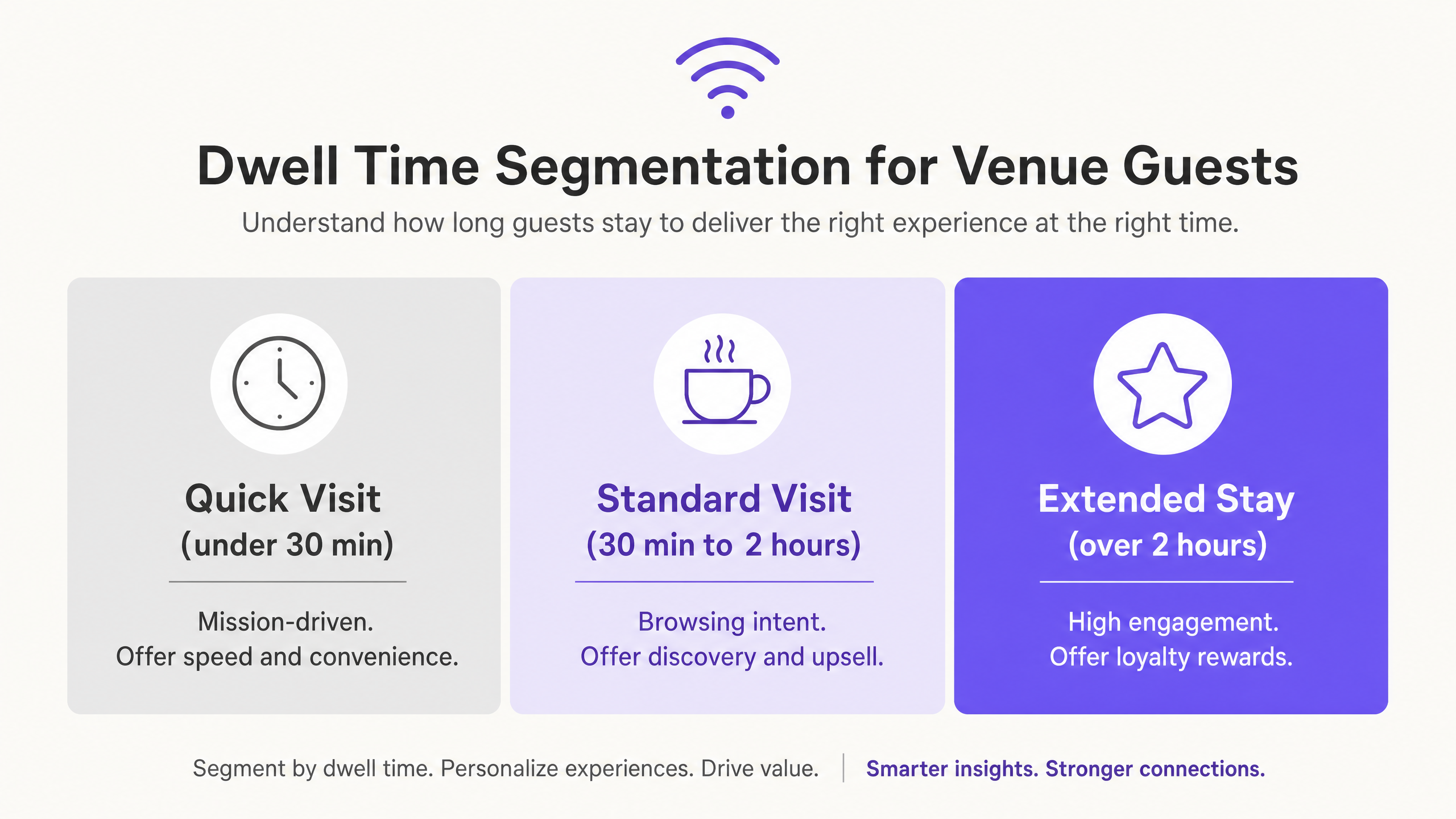
Dwell time is an indicator of intent. A guest who stays for 15 minutes is mission-driven. They came for a specific reason, completed it, and left. A guest who stays for two hours is in a completely different mindset - relaxed, open to discovery, and likely to spend more. These two guests require entirely different messaging.
Visit frequency tells you about loyalty. A guest who visits three times a week is a true regular. Your job is to reward that loyalty and recognise them. A guest who visited once six months ago and never returned is a lost opportunity. Your job is to win them back before they forget you exist.
Purple captures these metrics automatically. When a guest logs into your WiFi, they provide explicit consent - fully compliant with GDPR. Purple records the login time, logout time (or last-seen time), and the device's MAC address. This builds a dwell time record for every visit and a visit history for every returning guest. No surveys, no loyalty card sign-ups, no manual data entry.
The result is a verified, first-party dataset reflecting real-world behaviour. Purple runs in over 80,000+ active venues and recorded 440 million logins in 2024 (Purple internal data, 2024). That scale means this segmentation methodology is highly proven across hospitality, retail, travel, and events.
How to do this with your guest WiFi
Purple works as a cloud overlay on your existing hardware. You do not need to replace your access points. Purple integrates with Cisco Meraki, HPE Aruba, Ruckus, Juniper Mist, Ubiquiti UniFi, Cambium, Extreme, and Fortinet.
The setup process takes place in four steps.
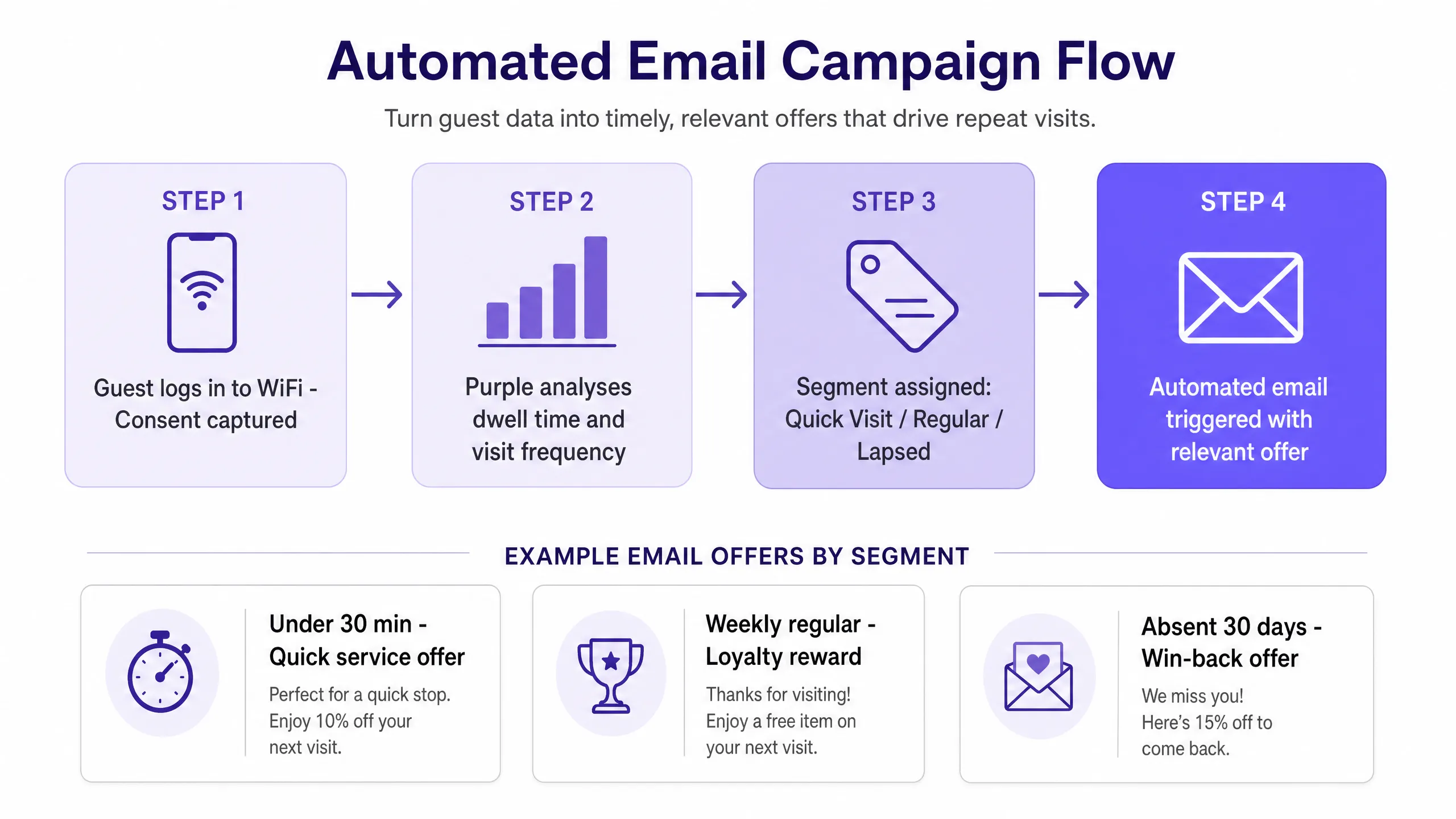
Step 1: Connect your hardware. Route your guest network traffic through Purple. With supported hardware, this typically takes less than an hour.
Step 2: Design your Captive Portal. This is the login screen your guests see when they connect. The value exchange must be clear. "Log in with your email to get early access to exclusive offers and events" outperforms "Log in to access WiFi" in terms of opt-in rate. Test two versions and track the difference over 30 days.
Step 3: Define your baseline segments. Start with five: First-time visitor (one visit, no return within seven days). Regular visitor (three or more visits within 30 days). Lapsed visitor (visited at least twice previously, no visit in 30 days). Short dwell (less than 30 minutes). Long dwell (more than two hours).
Step 4: Create your automated campaigns. Assign one campaign to each segment. Set the trigger condition, send delay, and offer. Review and optimise after 30 days.
Purple Engage, our CRM and email marketing platform built for physical venues, handles the segment logic, trigger conditions, and sending process. You only manage the creative and the offer.
What to send and when to send it
Timing and relevance dictate whether a campaign brings guests back or ends up in the bin. The table below pairs each segment with the right message and timing.
| Segment | Trigger | Message | Goal |
|---|---|---|---|
| First-time visitor | 24 hours after first visit | Welcome email giving a reason to return - a discount, event, or loyalty programme invitation | Second visit |
| Regular visitor | Monthly | Loyalty reward - free item, early access, or tier upgrade | Reinforce habit |
| Lapsed visitor | 30 days from last visit | Win-back offer with a clear deadline | Re-establish habit |
| Short dwell (under 30 mins) | 48 hours after visit | Quick-service promotion - takeaway offer, pickup, or speed-focused incentive | Increase visit frequency |
| Long dwell (over 2 hours) | 72 hours after visit | Experience-based offer - special event invitation, loyalty tier upgrade, or premium upsell | Increase spend per visit |
For specific copy templates and subject line guidance, see our guide on what to email guests after their first visit.
One rule applies to all segments: do not send more than one automated campaign per guest per week. Frequency caps prevent fatigue and protect your sender reputation.
Measuring what works
Do not evaluate success by open rates. Measure it by return visits and revenue.
When a guest returns after receiving an email, Purple tracks it. This is the true measure of campaign effectiveness. If you send a 'win-back' offer to a lapsed regular and their MAC address appears at your venue within 48 hours, the campaign succeeded. If you send a loyalty reward to long-dwell guests and the average spend in that segment increases, the campaign succeeded.
Track three metrics for each segment campaign.
Return visit rate: The percentage of recipients who visit the venue within seven days of receiving the email. This is your primary success metric.
Revenue per send: The total revenue generated from campaign recipients in the seven days following the email send, divided by the number of emails sent. This links the campaign directly to the bottom line.
Segment lifetime value: The average spend per visit multiplied by the average visit frequency for guests in each segment. You will notice that long-dwell guests have a higher lifetime value. This justifies a higher offer value for that segment.
Review these three metrics monthly. If a campaign's return visit rate drops below your baseline, change the offer. If revenue per send is stagnant, test a different send time or subject line.
Where to start
This is a sequential checklist. Complete each step before moving to the next.
- Connect your hardware (Cisco Meraki, HPE Aruba, or other supported access points) to Purple.
- Design a Captive Portal with a clear value exchange. A/B test two versions.
- Define your five baseline segments in Purple Engage: First-time, Regular, Lapsed, Short Dwell, Long Dwell.
- Set up an automated campaign for each segment. Start simple - one email, one offer, one trigger.
- After 30 days, review the return visit rate and revenue per send for each campaign.
- Optimise the lowest-performing campaign first. Change only one variable at a time.
- Once all five campaigns are performing above baseline, add a sixth segment based on what the data shows.
The list builds itself. Segments update automatically. Your job is to write the right offer, for the right guest, at the right time.