
WiFi-triggered email campaigns: what to send and when
WiFi-triggered email campaigns let venue operators turn every guest WiFi login into an automated marketing action - welcome sequences, loyalty rewards, win-back flows, and birthday offers - all fired by verified, first-party visit data.
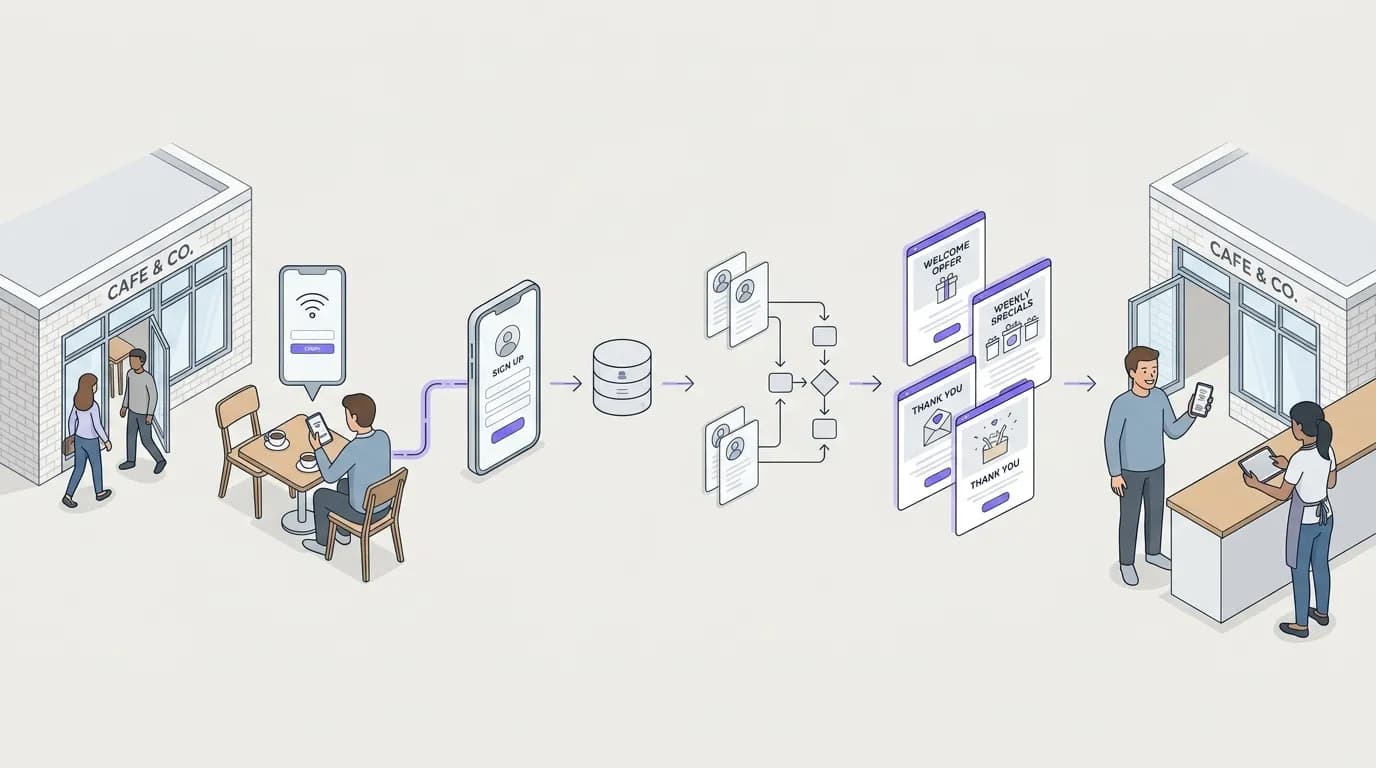
Video overview
Listen to this guide
Read the transcript
Hello, and welcome. Today we are talking about WiFi-triggered email campaigns. Specifically, what to send, and when to send it. If you run a physical venue - a restaurant, a hotel, a retail store - you already know that getting someone through the door the first time is expensive. The profit margin sits in the repeat visit. But how do you guarantee that repeat visit? You cannot just hope they had a good time and remember you. You need a system. And that is where your guest WiFi comes in. Let us start with why this matters. Generic email marketing relies on you building a list manually. You ask people to fill out a form on your website or drop a business card in a bowl. It is slow, and the conversion rates are low - typically one to three percent. When you use your guest WiFi to build your list, the process is automatic. A guest walks in, they want to connect to the internet, and they log in through a captive portal. They give you their email address and they opt in to marketing. It is a clear value exchange. It is conscious-choice, first-party data. And because they are physically in your venue, you know they are a real customer, not just a random website visitor. Now, let us talk about the approach. We are moving away from batch-and-blast newsletters. We are moving to behaviour-triggered automation. Think about the timing. You capture the data when they log in. The network registers their presence. And then, the system - like Purple Engage - takes action based on that visit data. So, what should you actually send? We recommend four core campaigns. First, the welcome sequence. This triggers after a guest's first visit. Do not send it while they are still in the venue. Send it thirty minutes after they leave. Say thank you, and give them a reason to come back quickly - a bounce-back offer valid for fourteen days. Automated welcome emails achieve open rates around sixty-eight percent. The guest just left; your venue is top of mind. Capitalise on that. Second, the frequency reward. This is your digital stamp card. Set a trigger for their fifth or tenth visit. When they hit that milestone, send an email an hour later. Acknowledge their loyalty and offer a tangible reward. It reinforces the behaviour you want. Third, the win-back campaign. When a regular guest stops coming, you need to interrupt their new routine. Decide what lapsed means for your venue. Maybe it is forty-five days. Set a trigger. If they do not appear on the network for forty-five days, send them an email. Give them a strong incentive to return. It is much cheaper to win back a lapsed guest than to acquire a new one. Research from Bain and Company shows that increasing customer retention by just five percent can increase profits by twenty-five to ninety-five percent. And fourth, the birthday offer. If you capture their date of birth at login, use it. Send an email seven days before their birthday. Give them an offer valid for their birthday week. Birthday emails have three times higher open rates than standard emails, and they usually drive group visits. Now, a word on pitfalls. The biggest mistake operators make is measuring the wrong things. Do not just look at open rates. An open rate does not pay the wages. You need to measure physical return visits. Because the WiFi network tracks the device, you can see if the person who received the win-back email actually walked back into your venue. That is your true conversion rate. Another pitfall is asking for too much information upfront. Keep the captive portal simple. Ask for the email, get the GDPR consent, and let them online. If you ask for their life history, they will abandon the login. Aim for a seventy percent opt-in rate or higher. Let us do a quick question and answer. Question one: Does this work if they do not log in every time? Yes. Once their device is registered, the network sees the device when they return, even if they do not actively log in again. The visit is logged. Question two: Is this compliant with privacy laws? Yes, provided your captive portal clearly states what the data will be used for and requires an active opt-in. This is exactly why first-party data is so valuable. It is fully compliant with GDPR. The guest made a conscious choice to share their data with you. Question three: How is this different from just using Mailchimp? Mailchimp sends the campaign. Purple Engage builds the list and sends the campaign. The list builds itself from every WiFi login, automatically. You do not need to import contacts, run competitions, or buy data. The network does the work. To summarise: Stop guessing who is in your venue. Use your guest WiFi to build a verified list. Set up a welcome email, a loyalty trigger, and a win-back campaign. Measure success by physical return visits, not just email opens. Your next step is simple. Audit your current captive portal. Make sure you are capturing emails effectively and that your GDPR consent is clear. Then, set up that first welcome automation. Start there, and let the network do the work. Thank you for listening.
Why this matters for your venue
Acquiring a new customer costs 5 to 25 times more than retaining an existing one.[1] For hospitality and retail venues, the profit margin sits in the repeat visit. Yet many operators leave this to luck, simply hoping that a good experience will bring people back. WiFi-triggered email campaigns remove that uncertainty. They turn your existing offline footfall into a verified, conscious-choice email list, and automatically send the right message based on exactly when and how often someone visits.
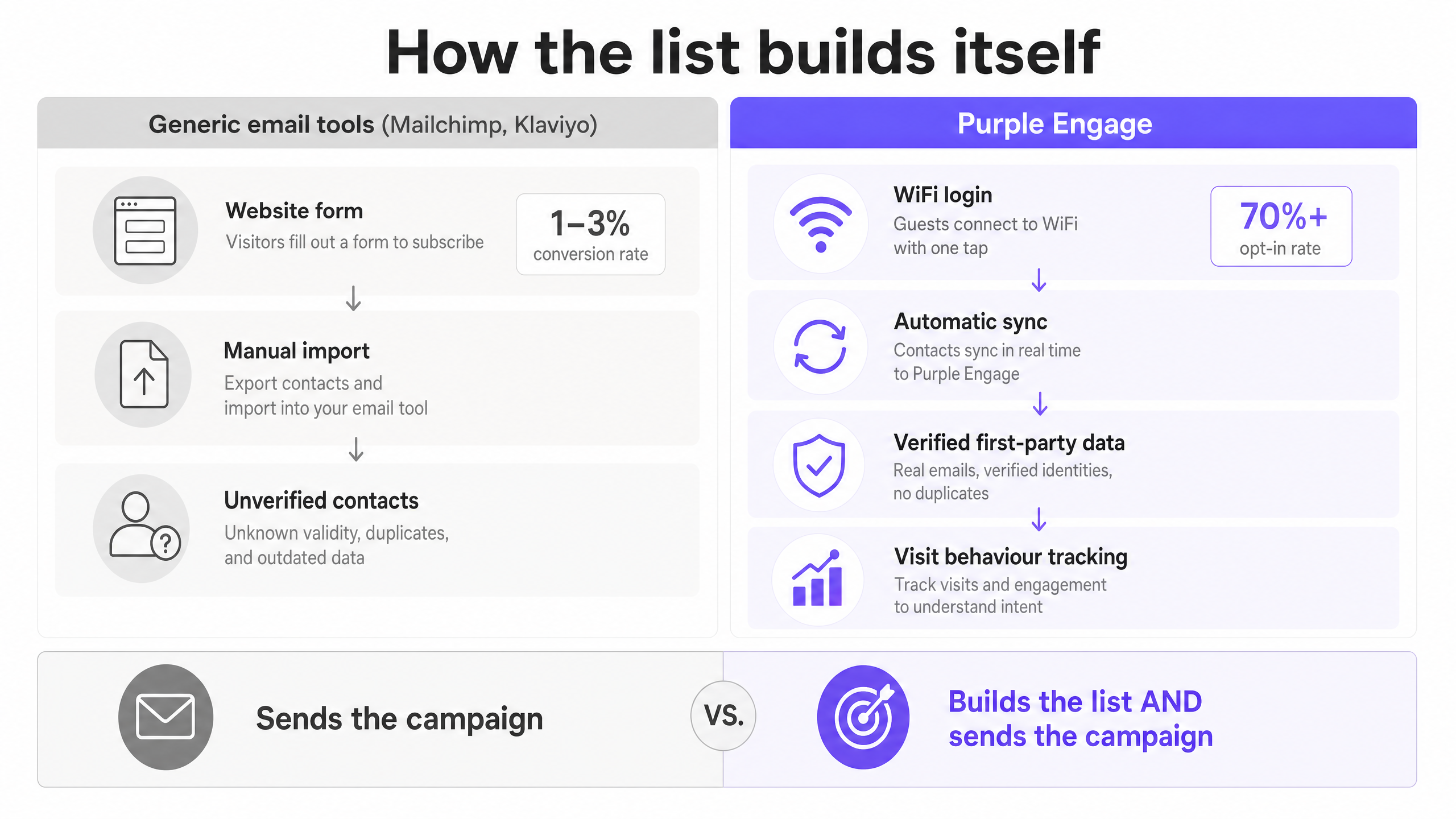
When you rely on generic email tools, you have to build the list manually. You put a sign on the counter or a form on your website. Conversion rates run at around 1% to 3%. With Guest WiFi, the network builds the list for you. When guests log in to access the internet, they hand over first-party data in a clear value exchange. You can then use Purple Engage to automate campaigns based on their actual physical presence. This is not guessing who might visit; it is acting on verified visit data drawn from more than 80,000 physical venues and 440 million logins recorded in 2024 (Purple internal data).
The approach
The core method shifts your email strategy away from batch-and-blast sends towards behaviour-triggered automation. Rather than emailing a newsletter to 10,000 people on a Tuesday morning, you send a targeted email to a specific guest precisely 30 minutes after they leave your venue, or exactly 45 days after their last visit.
The approach relies on three elements working together. First, capture: the guest connects to the WiFi and opts in. Second, trigger: the network records a visit event - a first login, dwell time, a departure, or an absence. Third, action: the system sends the email pre-configured for that specific event.
Automated emails achieve open rates 52% higher than standard campaigns.[2] Welcome emails specifically average a 68.6% open rate.[3] The critical difference is relevance. The guest receives the message while your venue is still fresh in their mind.
| Campaign type | Trigger event | Timing | Primary goal |
|---|---|---|---|
| Welcome sequence | First WiFi login | 30 minutes after departure | Drive the second visit |
| Frequency reward | 5th or 10th visit | 1 hour after the milestone visit | Reinforce loyalty |
| Win-back campaign | 45-90 days without a visit | When the lapsed threshold is reached | Recover lapsed guests |
| Birthday offer | Date of birth on file | 7 days before the birthday | Drive group visits |
How to do it with your guest WiFi
The technical foundation requires a network that captures guest data and an email platform that can read it. With Purple Engage, the process is managed centrally.
When a guest connects via Cisco Meraki, HPE Aruba, Ruckus, Juniper Mist, or Ubiquiti UniFi, they see a captive portal - a branded login page. They authenticate with an email address or a social login. They give explicit consent to GDPR-compliant marketing communications. The network records the device identifier and links it to their profile.
From that moment, the network tracks their presence. When they return, the system recognises their device and logs a repeat visit. This visit data flows directly into the Engage platform, which evaluates the guest against your campaign rules. If they qualify - for example, this is their third visit this month - the system automatically triggers the corresponding email.
For more on the data capture process, see our guide First-party data for venues: what it is and how to collect it.
What to send and when
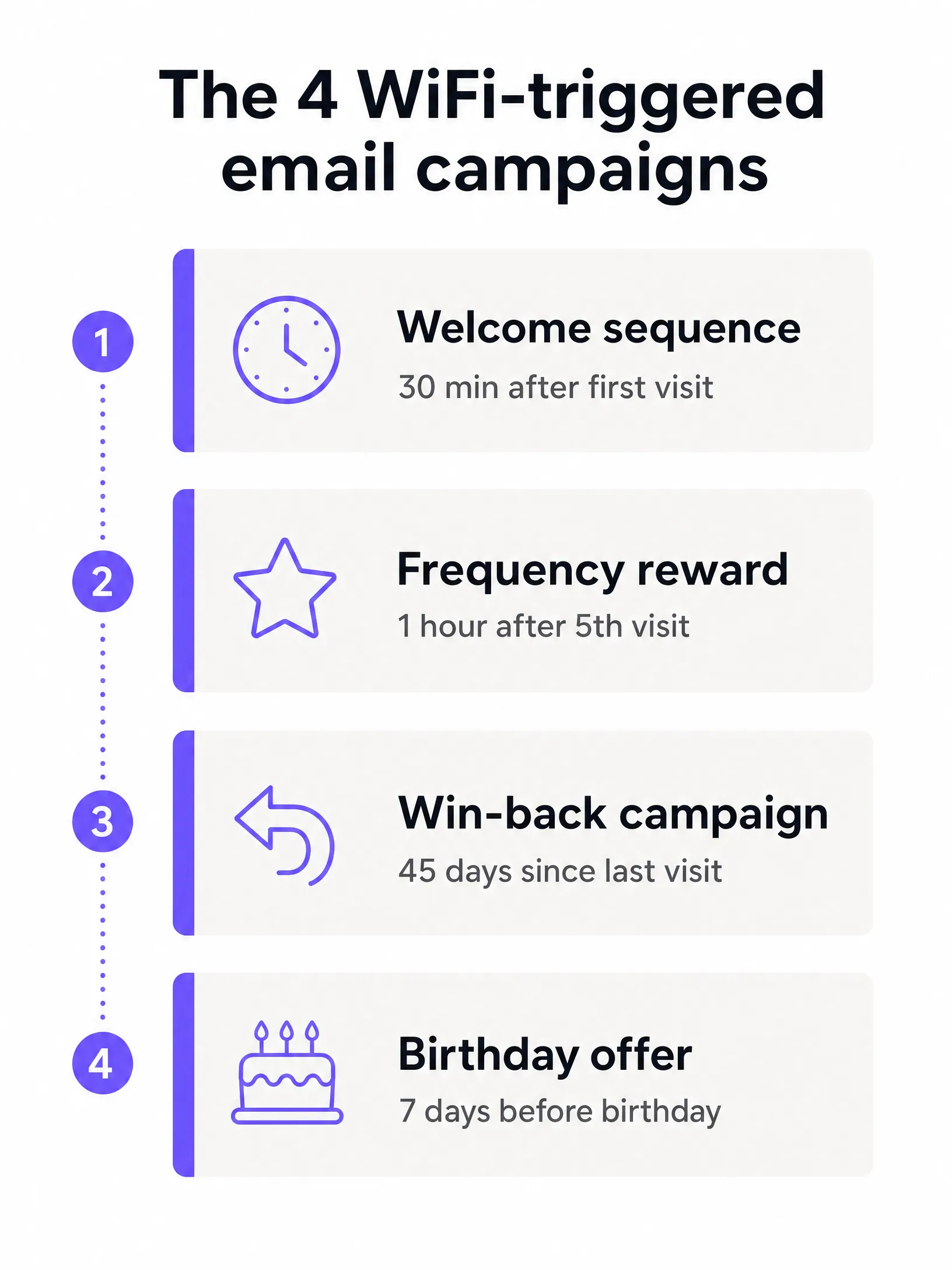
Success with WiFi-triggered email campaigns lies in segmentation. You must align the message with the guest's relationship to your venue. Here are the four core campaigns every operator should implement.
The welcome sequence
Triggered immediately after a first-time guest logs in to the WiFi. The goal is to thank them for the visit and encourage a quick return. Send it 30 minutes after they disconnect from the network. Include a simple thank-you and a bounce-back offer - such as 10% off their next purchase - valid for 14 days. Welcome emails generate 320% more revenue per email than promotional sends.[3] The guest is still nearby or has just arrived home, and the experience is still fresh.
The frequency reward
Triggered when a guest reaches a specific visit milestone. This replaces the physical stamp card with automated recognition. Send it one hour after their 5th or 10th recorded visit. Thank them for their loyalty and offer a tangible reward, such as a free item or an upgrade on their next visit. This reinforces positive behaviour and increases lifetime value.
The win-back campaign
Triggered when a regular guest stops visiting. The goal is to interrupt their new routine and draw them back. Set the threshold at 45 or 60 days since their last recorded visit, depending on your typical guest cycle. Send a direct, compelling offer - a free starter or a substantial discount. Increasing customer retention by just 5% increases profits by 25% to 95%.[1] A targeted incentive costs less than acquiring a brand-new customer.
The birthday offer
Triggered from the date of birth collected during the WiFi login. Send it seven days before their birthday, with an offer valid during their birthday week. Birthday emails achieve three times the open rate of standard emails.[4] They drive group bookings and high-value visits.
For more strategies on list growth, see How to build an email list from your WiFi (without buying one).
Measuring success
Do not measure success purely by open rates or click rates. While a 31% open rate is a solid cross-industry benchmark,[5] open rates do not pay the bills. You must measure business outcomes: return visit rate and revenue per send.
Because Purple Engage tracks physical footfall, you can close the marketing loop. You send a win-back email to 500 lapsed guests. Thirty days later, you check the platform to see how many of those specific devices reappeared on the network. That is your true conversion rate.
| Metric | What it measures | Target |
|---|---|---|
| Return visit rate | Percentage of email recipients who physically return within the offer window | Varies by campaign; aim for 15%+ on win-back |
| Opt-in rate | Percentage of WiFi users consenting to marketing | 70% or higher |
| List growth rate | Net new subscribers per week | Proportional to daily logins |
| Revenue per send | Total revenue attributable to the campaign divided by emails sent | Track against offer cost |
Where to start
Implementation requires a systematic approach. Do not launch five campaigns at once. Start with the automations that deliver the greatest impact.
- Audit your captive portal. Ensure your login journey requires an email address and includes a clear GDPR consent clause. Remove unnecessary fields.
- Activate the welcome email. Configure a single automated email triggered after a guest's first visit. Include a clear bounce-back offer.
- Define your lapsed threshold. Determine the number of days that defines a lapsed guest for your specific venue type - 30 days for a coffee shop, 90 days for a hotel.
- Launch the win-back campaign. Build the automated email targeting guests who pass that lapsed threshold.
- Review physical conversions. After 30 days, review the platform data to see how many email recipients physically returned to the venue. Adjust your offers based on this data.
References
[1] Bain and Company, "Retaining Customers Is the Real Challenge", https://www.bain.com/insights/retaining-customers-is-the-real-challenge/ [2] Mailmend, "34 Welcome Email Performance Statistics", https://mailmend.io/blogs/welcome-email-performance-statistics [3] Invespcro, "Welcome Emails", https://www.invespcro.com/blog/welcome-emails/ [4] Forbes Advisor, "49 Top Email Marketing Statistics", https://www.forbes.com/advisor/business/software/email-marketing-statistics-jun-26/ [5] Klaviyo, "Email Marketing Benchmarks 2026", https://www.klaviyo.com/uk/blog/email-marketing-benchmarks-open-click-and-conversion-rates