
Attributing return visits to your email campaigns
This guide explains how physical venues can attribute return visits directly to their email marketing campaigns - the metric that generic tools like Mailchimp and Klaviyo cannot provide.
Video overview
Listen to this guide
Read the transcript
Welcome to the Purple Engage strategy series. I'm your host, and today we're getting into a problem that has frustrated venue operators for years: proving that your email marketing actually drives people back through your doors. Over the next ten minutes, we'll cover why this matters, how the approach works, the practical steps to get it running, a few common pitfalls, and some quick questions I get asked all the time. Let's start. Why it matters. You send a campaign. Mailchimp tells you 22% of people opened it. That feels decent. But here's the honest question: did any of those people actually come back to your restaurant, your bar, your hotel, your shop? You don't know. And that's the problem. For a physical venue, an open rate is a vanity metric. It measures a digital behaviour, not a physical one. The only metric that truly matters for your business is a return visit. Because a return visit means revenue. If you can't connect an email send to a physical visit, you can't prove the return on investment of your marketing spend. You're left guessing whether a busy Friday was the result of your Wednesday campaign, or just the weather, or a football match down the road. This is the gap that generic email tools simply cannot close. Mailchimp, Klaviyo, HubSpot - they're excellent at sending emails and tracking digital engagement. But they were not built for physical venues. They don't know what happens after the click. They can't see your front door. Purple Engage was. And it can. The approach. So how does footfall attribution actually work? It comes down to a single, continuous thread: the device. When a guest visits your venue and logs into your Guest WiFi, they pass through a captive portal. This is the branded splash page where they enter their email address, or log in with a social account, and tick the box to say yes, they're happy to receive marketing from you. That's your conscious-choice opt-in. It's first-party data, collected with explicit GDPR consent. No grey areas. At that moment, Purple does something that generic email tools cannot. It links the email address to the device's MAC address. The MAC address is a unique identifier assigned to every network device. It's the digital fingerprint of that guest's phone or tablet. Now your customer list builds itself. Every guest who uses your WiFi and opts in becomes a verified, on-premise contact in Purple Engage. Not a purchased list. Not a scraped database. Real people who have physically been in your venue. When you send a campaign, Purple Engage knows exactly who received it. And when one of those guests returns to your venue, their device probes the network. Even if they don't actively connect, the device sends out a signal looking for known networks. Purple detects that probe, recognises the MAC address, and attributes that physical visit to the campaign you sent. The loop is closed. You have definitive proof that your email drove a return visit. Now, let's talk about what you should actually be sending, and when. Generic newsletters rarely move the needle for physical venues. You need targeted, automated campaigns based on visit history. Here are three that work. First, the welcome email. Send a thank you message 24 hours after a guest's first visit. Keep it short. Acknowledge they were there. Include an incentive for their next visit - a discount, a free item, a priority booking. This is the highest-engagement email you'll ever send, because the visit is fresh in their mind. Second, the win-back campaign. Set up an automation that triggers when a guest hasn't been seen for 60 days. The message is simple: we haven't seen you in a while, here's a reason to come back. This is where footfall attribution really earns its keep. You can see exactly how many lapsed guests that campaign reactivated. Third, the birthday reward. If you collect dates of birth on your captive portal, automate a birthday email with a personalised offer. These have consistently high redemption rates because they feel personal rather than broadcast. Practical steps and pitfalls. Getting this set up is straightforward, but there are a few things to get right from the start. Step one: audit your captive portal. Make sure it's capturing email addresses and recording clear GDPR consent. If your current portal just asks for a name and lets people straight through, you're leaving your entire marketing database on the table. Step two: define your attribution window. This is the period of time after an email send during which a return visit is credited to that campaign. Fourteen days is a sensible default for most venues. You can tighten it to seven days for time-limited offers, or extend it to 30 days for slower-cycle businesses like hotels. Step three: set your baseline. Before you run your first attributed campaign, look at your natural return visit rate. How many guests come back within 14 days without any email prompt? This is your control figure. Your campaigns need to beat it. Step four: don't optimise for opens. I know it's tempting to chase a higher open rate, but it's the wrong metric for a physical venue. Optimise for return visits per thousand emails sent. That's the number that connects to revenue. Now, the pitfalls. The most common mistake is treating the email list like a broadcast channel. Sending the same message to every guest, every week, regardless of their visit history, is a fast route to high unsubscribe rates and low footfall attribution. Segment by recency. Treat a guest who visited yesterday differently from one who hasn't been in six months. The second pitfall is ignoring the attribution window. If you set a 30-day window and then send a campaign every week, you'll double-count return visits and overstate your results. Be consistent. Pick a window and stick to it. The third pitfall is not connecting the data to revenue. You can see that 50 guests returned after a campaign. But do you know how much they spent? Connect your average transaction value to your return visit count and you have a revenue per send figure. That's the number your finance director understands. Quick questions. I get asked a few questions about this regularly, so let me run through them quickly. Does this work if guests don't actively connect to the WiFi on their return visit? Yes. Modern devices continuously probe for known networks. Purple detects this probe without requiring the guest to actively log in again. What about MAC address randomisation? Apple and Android devices do randomise MAC addresses for privacy. Purple handles this through a combination of the original authenticated MAC address and session-level identifiers captured at login. It's not perfect for every single visit, but it's accurate enough for campaign-level attribution at scale. Can I use this data to prove return on investment to my board? Absolutely. Return visits attributed to a campaign, multiplied by average transaction value, gives you a hard revenue figure. That's a direct line from marketing spend to revenue. Summary and next steps. Let me bring this together. Generic email tools send the campaign. They cannot tell you who came back. Purple Engage uses the same WiFi login that captured the email address to detect the return visit and attribute it to the send. The list builds itself from verified, first-party, GDPR-compliant data. The attribution is automatic. The metrics are physical, not just digital. If you're currently measuring your email marketing by open rates alone, you're missing the most important number: how many people came back. Here's where to start this week. Log into your Purple Engage account and check your captive portal is capturing emails and consent. Set up one automated campaign - the welcome email is the easiest win. Define a 14-day attribution window. Review the return visit data after 30 days. That's it. One campaign, one window, 30 days. You'll have more useful data than a year's worth of open rate reports. Thanks for listening. We'll be back with more from the Purple Engage strategy series shortly.
Why this matters for your venue
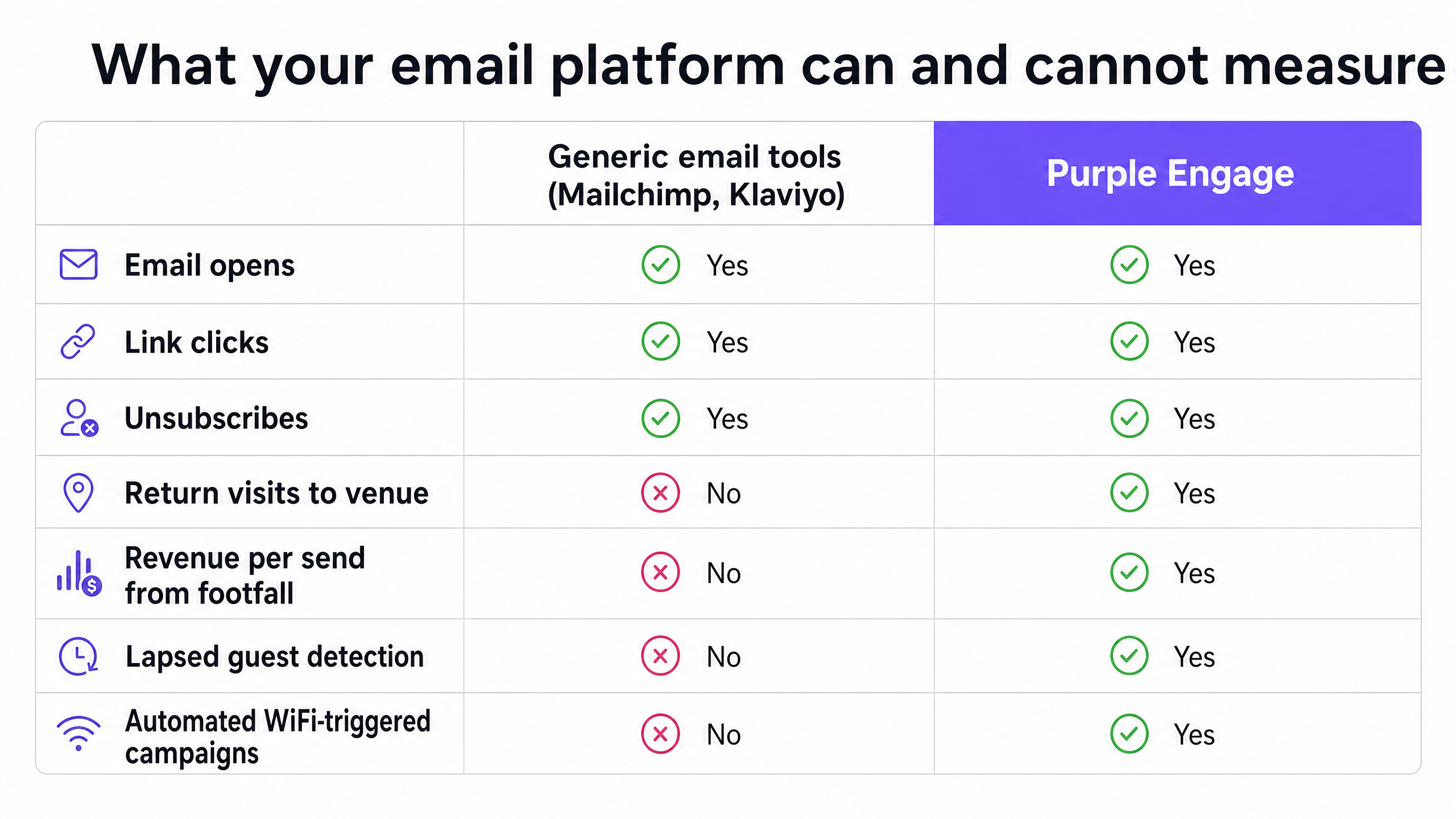
Sending an email is easy. Knowing whether it worked is hard. Generic email tools tell you who opened a message and who clicked a link. They cannot tell you who walked back through your doors. For a physical venue, an open rate is a vanity metric. A return visit is revenue.
If you cannot measure footfall attribution, you cannot prove the return on investment of your email marketing. You are left guessing whether a busy Friday was the result of your Wednesday campaign, a sunny afternoon, or a football match down the road. That ambiguity costs you budget, credibility with your board, and the ability to improve your campaigns over time.
The problem is structural. Tools like Mailchimp, Klaviyo, and HubSpot were built for digital-first businesses. They track what happens in the inbox and on the website. They were not designed to see your front door. Purple Engage was. We connect the digital send to the physical visit, using the same infrastructure your guests already use to get online.
The approach
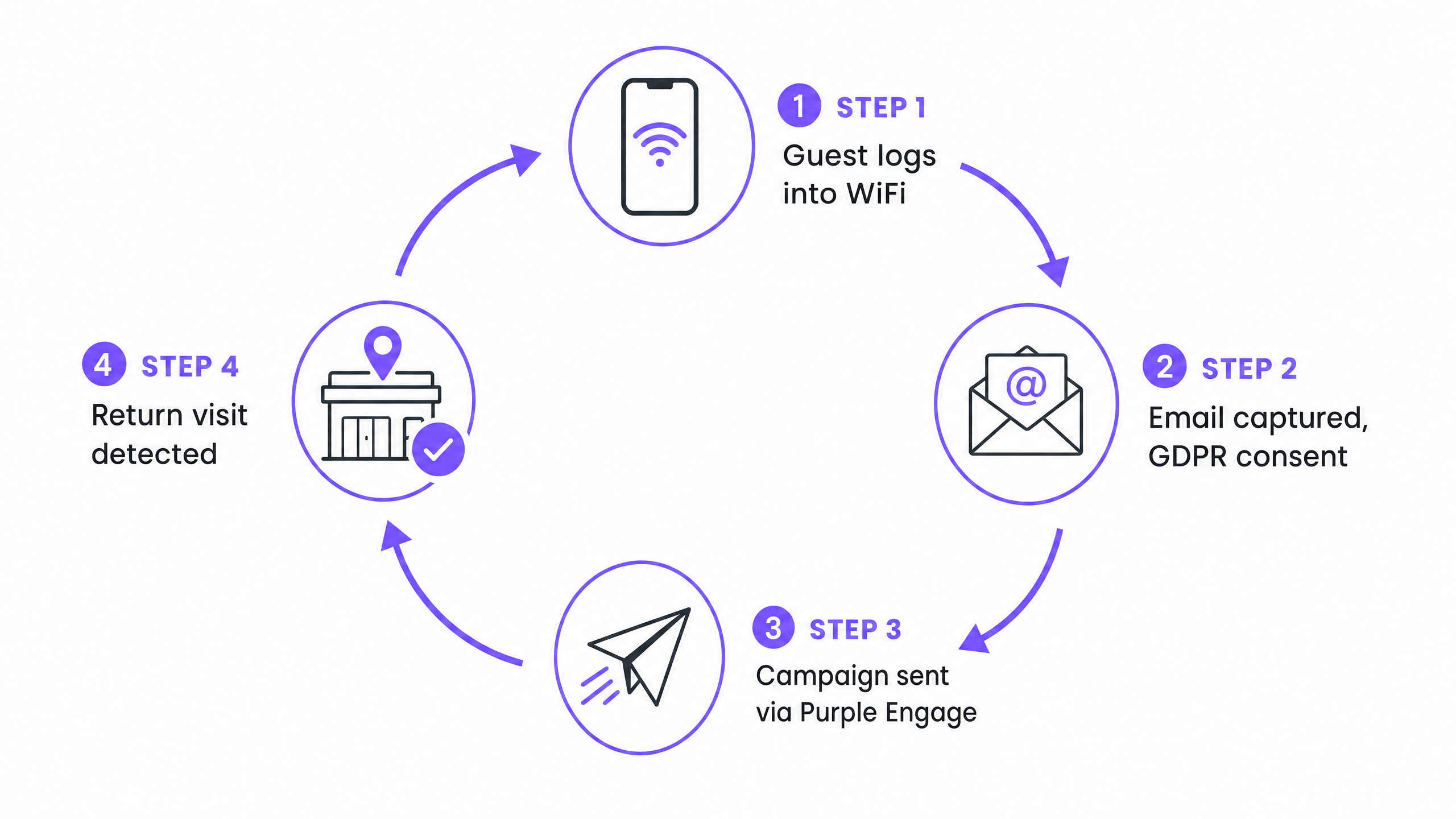
The method relies on a single, continuous thread: the device MAC address. When a guest logs into your Guest WiFi, Purple captures their email address and links it to their device identifier. This is a conscious-choice, first-party opt-in, collected in full compliance with GDPR. The guest sees a branded captive portal, enters their email, and explicitly ticks a consent checkbox. No dark patterns, no pre-ticked boxes.
When you send a campaign through Purple Engage, the system knows exactly who received it. When that same device returns to your venue - even if the guest keeps their phone in their pocket - the device probes the network looking for known access points. Purple detects that probe, matches the MAC address to the campaign recipient, and attributes the physical visit to the send. The loop is closed.
This is the core differentiator. Mailchimp can tell you who opened the email. Purple can tell you who came back.
How to do it with your guest WiFi
The foundation is a properly configured Guest WiFi network with a captive portal that captures consent. Without this, you have no list, no attribution, and no proof. Here is how to set it up correctly.
Step 1 - Configure the captive portal. Your splash page must require an email address or social login. The GDPR consent checkbox must be unticked by default and must clearly state that data will be used for marketing communications. Purple's portal builder handles this natively, with compliant consent language built in.
Step 2 - Let the list build itself. As guests visit your venue and use the WiFi, Purple Engage automatically adds verified, on-premise contacts to your database. Unlike a purchased list or a sign-up form on your website, every contact in this list has physically been in your venue. Purple has collected 440 million logins across 80,000+ live venues in 2024 (Purple internal data), which gives you a sense of the scale this approach operates at.
Step 3 - Segment before you send. Do not broadcast to your entire list. Use visit recency and frequency to create targeted segments. Guests who visited once six months ago need a different message from guests who visit every week. For a detailed segmentation framework, see our guide on Segmenting guests by visit frequency: how to reward your best customers.
Step 4 - Send the campaign. Build your email in Purple Engage and target your chosen segment. The system records the send timestamp and the list of recipients.
Step 5 - Track the return. Purple monitors device probes across your access points. When a recipient's device is detected within your attribution window, the visit is logged and attributed to the campaign. You see the return visit count in your campaign report alongside the standard open and click metrics.
What to send, and when
Timing and relevance drive return visits. A generic newsletter sent to your full list every month will generate some opens and almost no attributable footfall. You need automated, behaviour-triggered campaigns. These three consistently perform across hospitality, retail, and leisure venues.
The welcome email. Send a thank you message 24 hours after a guest's first visit. Acknowledge that they were there. Include a specific incentive for their next visit - a discount, a complimentary item, or a priority booking link. This is the highest-engagement email you will ever send, because the experience is fresh and the relationship is new.
The win-back campaign. Automate an email to trigger when a guest has not been detected at your venue for 60 days. Keep the message direct: you haven't seen them in a while, here is a reason to come back. This is where footfall attribution earns its keep - you can see exactly how many lapsed guests the campaign reactivated, and calculate the revenue that reactivation generated.
The birthday reward. Collect dates of birth on your captive portal and automate a birthday offer. Redemption rates on birthday emails are consistently higher than broadcast campaigns because they feel personal rather than promotional.
For venues running multiple locations, all three automations work at scale. Purple Engage applies the same logic across every site in your estate, attributing return visits to the specific location the guest returns to.
Measuring what works
With Purple Engage, your primary campaign metric shifts from open rate to return visits. Your campaign report shows the number of recipients, the number who opened, the number who clicked, and - crucially - the number who physically returned to your venue within the attribution window you defined.
This allows you to calculate revenue per send. If a campaign drove 50 return visits and your average spend per head is £20, that campaign generated £1,000 in attributable revenue. Divide that by the number of emails sent and you have a revenue-per-send figure that your finance director will understand immediately.
| Metric | What it measures | Who cares |
|---|---|---|
| Open rate | Email was viewed | Email marketing team |
| Click-through rate | Link in email was clicked | Email marketing team |
| Return visits | Guest physically came back | Marketing director, finance |
| Revenue per send | Revenue attributable to the campaign | CEO, finance director |
| Lifetime value uplift | Long-term spend change in attributed guests | CRM director |
Track your natural return visit rate before you run your first attributed campaign. This is your baseline - the percentage of guests who return within your attribution window without any email prompt. Your campaigns need to beat this figure to demonstrate genuine incremental impact.
Where to start
- Audit your current Guest WiFi captive portal. Confirm it captures email addresses and records explicit GDPR consent.
- Check your existing email platform. If it is Mailchimp, Klaviyo, or a similar generic tool, identify what return visit data you are currently missing.
- Set up Purple Engage and connect it to your WiFi infrastructure. Purple works with Cisco Meraki, HPE Aruba, Ruckus, Juniper Mist, Ubiquiti UniFi, Cambium, Extreme, and Fortinet.
- Define your attribution window. Fourteen days is the right starting point for most venues.
- Set your baseline return visit rate before sending your first campaign.
- Build and send a welcome email automation. Review the return visit data after 30 days.
- Use those results to make the case for expanding your campaign programme.