
Guest WiFi email capture: how it works and what to expect
Guest WiFi email capture turns every WiFi login into a verified, GDPR-aligned contact in a database you own.
Video overview
Listen to this guide
Read the transcript
Welcome to the Purple briefing. Today we are looking at guest WiFi email capture - specifically, how it works, what to expect, and why it is the most effective way to build a first-party database for your physical venue. Let's start with why this matters. If you operate a restaurant, a hotel, a retail store, or a stadium, you have hundreds or thousands of people walking through your doors every day. Most of them are anonymous. They visit, they buy, they leave. If you want them to come back, you have to pay a third-party platform - like Facebook or Google - to reach them again. That is expensive, and it relies on third-party cookies that are rapidly disappearing. The alternative is capturing their details while they are in your venue. You could use a QR code on a table, or ask them at the point of sale, but the conversion rates are typically low. Guest WiFi changes the equation entirely. It introduces a clear value exchange: you provide free, high-speed internet access; in return, the guest provides their email address and, crucially, has the option to opt into your marketing. When you implement this correctly, the results are significant. Venues using Purple typically see opt-in rates between 30 and 50 per cent. That means your customer database builds itself, automatically, every single day, with verified, conscious-choice data. This is not a list you bought from a broker. These are real people who walked into your venue, connected to your network, and chose to hear from you. So, how does it actually work? The approach relies on a few key components working together. First, you have your network hardware - access points from vendors like Cisco Meraki, HPE Aruba, or Ruckus. You configure an open guest network on this hardware. But instead of letting devices straight onto the internet, the hardware intercepts the connection and redirects the visitor to a captive portal. This captive portal is a branded splash page hosted by Purple. This is where the transaction happens. The guest sees your logo, a clear value proposition, and a login form. They enter their email address or use a social login like Google or Microsoft. Now, this is where compliance is critical. Under GDPR, you cannot force someone to accept marketing emails just to get WiFi. The consent must be freely given, specific, informed, and unambiguous. So, your portal must include an unticked checkbox for marketing communications. The guest makes a conscious choice to opt in. Purple logs that consent with a timestamp, the specific wording shown, and the IP address - everything you need for a GDPR audit. Once they submit the form, Purple acts as the RADIUS server - the authentication system that tells your local hardware who is allowed on the network. Purple tells the access point: yes, this device has completed the process, grant them access. The hardware authorises the device's MAC address, and the guest is online. Meanwhile, Purple securely stores the profile data and the consent status in your CRM database. That is the basic flow. But there are a few practical steps and pitfalls you need to manage. The biggest pitfall is fake data. If someone just wants to get online quickly, they might type a nonsense email address. If your database fills up with fake emails, your bounce rates will spike, and your sender reputation will be damaged. Email service providers like Gmail and Outlook track bounce rates. If yours gets too high, your legitimate emails start landing in spam folders. The solution is email verification. Within Purple, you can configure the system to grant temporary or restricted access when an email is submitted. The system immediately sends a verification link to that address. The guest has to open their inbox and click the link to unlock full internet access. This guarantees that every email in your database is valid and deliverable. Another pitfall is friction. You want the data, but you do not want to annoy your loyal guests by making them fill out a form every time they visit. This is where MAC address tracking is invaluable. Once a device is authenticated, Purple remembers it. You can set a policy so that if the guest returns within, say, 365 days, they connect automatically without seeing the portal again. They get a seamless experience, and you still get a log of their return visit in your analytics. There is also the question of what data to ask for. Keep the form short. Email is essential. A first name is useful for personalisation. Date of birth is valuable if you want to run birthday campaigns. But do not ask for ten fields of information - every additional field reduces your completion rate. A good rule of thumb is: ask for the minimum you need to deliver a personalised experience. Now, capturing the data is only the first half of the strategy. The value comes from what you do with it. This is where Purple Engage differs from generic tools like Mailchimp or Klaviyo. Generic tools send campaigns based on digital behaviour - did they open the email? Did they click the link? Those metrics matter, but they do not tell you whether someone actually came back to your venue. Purple Engage sends campaigns based on physical behaviour. Here is an example. You set up an automated Welcome Email that triggers exactly 15 minutes after a guest's first login. It introduces your brand, delivers any incentive you promised on the splash page, and sets expectations for future emails. This is not a newsletter blast. It is a triggered, personalised message sent at the exact moment when your venue is fresh in the guest's mind. You can also set up a Lapsed Visitor campaign. Because Purple tracks the MAC address, it knows when a device connects. If a guest has not been seen in your venue for 60 days, Purple automatically triggers a message to win them back. The timing is based on real-world absence, not an arbitrary calendar date. And this leads us to the most important point about measuring what works. When your email list is tied to your physical venue, you stop measuring success purely by open rates. You measure it by footfall. You can send a promotional campaign on a Tuesday, and because Purple tracks the devices, you can see exactly how many of those recipients physically walked into your venue on Friday. This is closed-loop attribution. It allows you to calculate the true return on investment for your marketing, optimising for revenue rather than vanity metrics. Think about what this means in practice. You send a campaign to 10,000 contacts. 4,200 open it. 600 click through to your website. But 1,800 of those contacts walked into your venue within seven days of receiving the email. That is the number that matters. That is the number that tells you whether your marketing is actually driving business. Now let's talk about where to start. I want to give you a practical, ordered checklist. Step one: audit your hardware. Confirm your current access points support external captive portals and RADIUS authentication. If you are running Cisco Meraki, HPE Aruba, Ruckus, Juniper Mist, or Ubiquiti UniFi, you are in good shape. Purple works with all of them. Step two: define your data requirements. Decide what data matters most for your business. Email is essential. Think carefully about whether date of birth or postcode would genuinely improve your campaigns before adding them to the form. Step three: draft a compelling value proposition. "Sign up for our newsletter" is not an incentive. "Join the WiFi for 15 percent off today's purchase" is. The incentive sits right next to the marketing consent checkbox, which dramatically increases your opt-in rate. Step four: build your automated flows in Purple Engage before you go live. Set up the welcome email and the lapsed visitor campaign so they are ready to trigger the moment the portal launches. Step five: launch it in a single test venue. Monitor the opt-in rate for 48 hours. Check the verification process is working. Once you are satisfied, deploy across your entire estate. Let me close with a summary of the key points. Guest WiFi email capture turns anonymous foot traffic into a verified, first-party database. The mechanism is a captive portal that intercepts the WiFi connection and requires an email address before granting access. GDPR compliance requires an unticked, optional marketing consent checkbox - but a compelling incentive will drive high opt-in rates. Email verification prevents fake data and protects your sender reputation. Purple Engage then uses that database to trigger automated campaigns based on real-world venue visits, and measures success by physical return visits rather than digital clicks alone. If you are currently using Mailchimp, Klaviyo, or HubSpot to send campaigns but relying on manual imports or website forms to build your list, guest WiFi capture is the fastest way to close that gap. The list builds itself. The campaigns run automatically. And the attribution is tied to the thing that actually matters: people coming back to your venue. To find out more about how Purple Engage works, visit purple dot ai. Thank you for listening.
Why this matters for your venue
Every day, guests walk into your restaurant, hotel, or store, connect to your WiFi, and leave without you knowing who they are. You have no way to reach them again unless you pay a third-party platform to find them. Facebook, Google, and programmatic ad networks all charge you to re-engage people who have already chosen to visit you. That is an expensive way to run a loyalty strategy, and it is getting more expensive as third-party cookies disappear.
Guest WiFi email capture closes that gap. It ties internet access to a value exchange: free connectivity in return for a verified email address and, where the guest chooses, marketing consent. The result is a first-party database that builds itself from foot traffic you are already generating. Venues using Purple Engage typically see opt-in rates of 30% to 50% (Purple internal data, 2024), generating thousands of verified contacts per location every month. Those contacts feed automated campaigns that drive repeat visits, increase revenue per send, and give you the closed-loop attribution to prove it.
If you are currently using Mailchimp, Klaviyo, or HubSpot to send campaigns, those tools are excellent at sending. They do not build the list. Guest WiFi is the mechanism that fills it.
The approach
The mechanism behind guest WiFi email capture is a Captive Portal - a web page that intercepts a device's internet connection and requires an action before granting access. When a guest selects your WiFi network, the access point redirects their device to a branded splash page. That splash page is where the data capture and consent logging happen.
The key distinction from a website sign-up form is volume and verification. A website form captures people who are already engaged enough to seek out a subscription. A Captive Portal captures every guest who connects to your network - including the ones who would never have found your website. And because the email address is required to complete the connection, the data quality is inherently higher than a voluntary form.
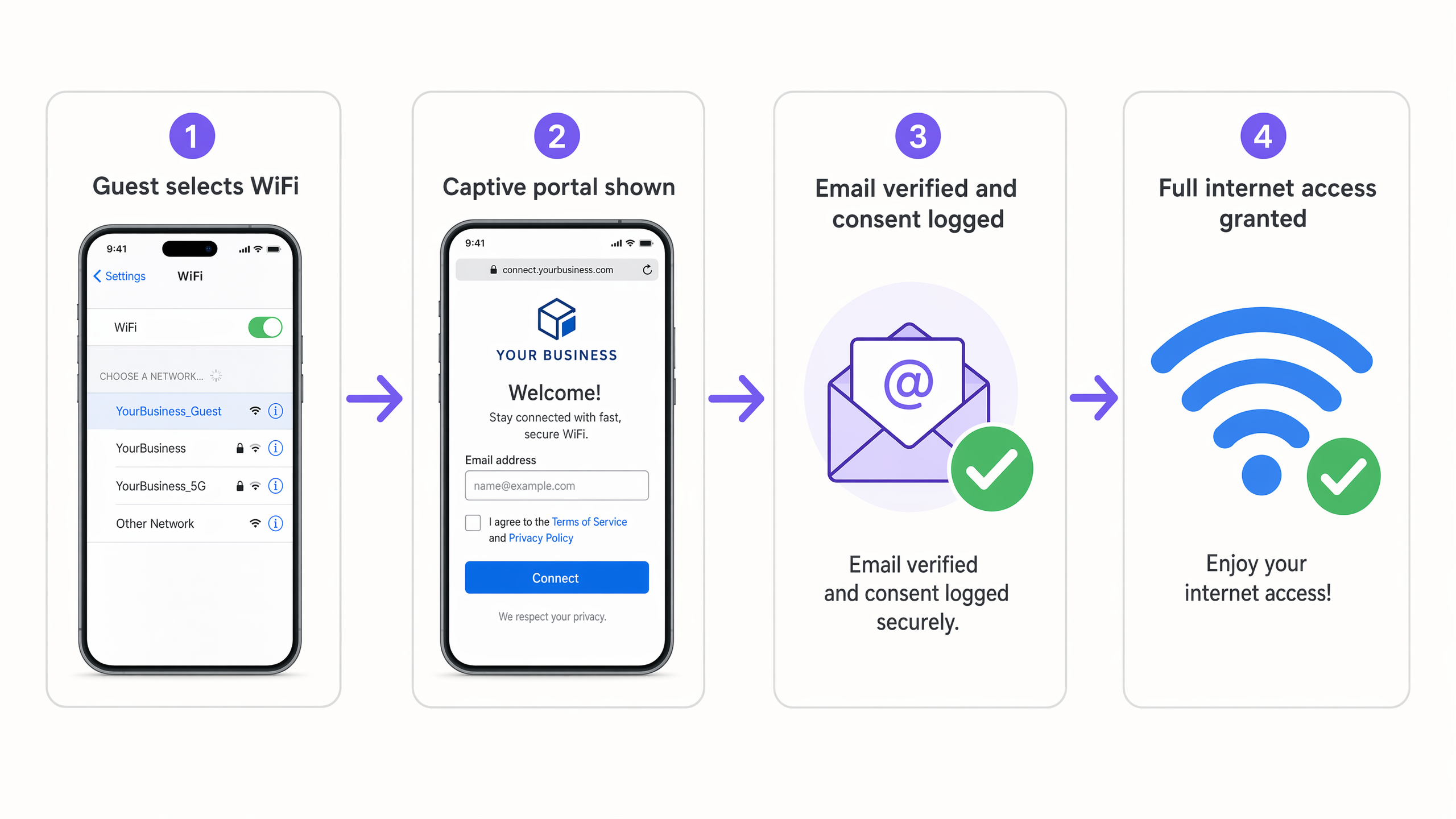
The flow has four steps. The guest selects your WiFi network. The hardware redirects them to the Purple-hosted splash page. They enter their email address and, optionally, check the marketing consent checkbox. Purple logs the profile and consent data, then authorises the device via RADIUS, granting full internet access.
GDPR is the governing framework for this process in the UK and EU. It requires that marketing consent be freely given, specific, informed, and unambiguous. That means the consent checkbox must be unchecked by default, the purpose of the marketing must be clearly stated next to it, and consent cannot be bundled with the terms for internet access. Purple handles the consent logging automatically, recording the timestamp, the exact wording shown, and the IP address for every opt-in.
How to do it with your guest WiFi
Implementing guest WiFi email capture requires four configuration steps.
Step 1 - Configure the SSID. Set up an open SSID on your access points. Enable MAC-based authentication and configure a walled garden that allows traffic only to the Purple portal and any social login providers (such as Google Workspace or Microsoft Entra ID) before authentication is complete. Purple works with Cisco Meraki, HPE Aruba, Ruckus, Juniper Mist, Ubiquiti UniFi, Cambium, Extreme, and Fortinet out of the box.
Step 2 - Design the splash page. Use Purple's drag-and-drop editor to build a branded captive portal. Keep it clean: your logo, a value proposition that explains the exchange, and the login form. The value proposition is the single biggest lever on your opt-in rate. "Connect to our WiFi" is not a value proposition. "Connect for free WiFi and 15% off your next visit" is.
Step 3 - Set the consent rules. Configure which data fields appear on the form. Email is the minimum. First name enables personalisation. Date of birth enables birthday campaigns. Every additional field reduces completion rates, so ask only for what you will use. The marketing consent checkbox must be optional, clearly labelled, and unchecked. Purple generates the GDPR-compliant consent text automatically.
Step 4 - Enable email verification. Configure Purple to grant restricted access (for example, five minutes at reduced speed) immediately after form submission, then send a verification link to the submitted address. Full access is granted only once the guest clicks the link. This eliminates fake email entries and keeps your sender reputation clean.
Once the portal is live, Purple remembers authenticated devices by their MAC address. You can set a re-authentication window of up to 365 days, meaning returning guests connect automatically without seeing the portal again. This protects the experience for loyal guests while still logging their return visit in your analytics.
What to send, and when
The database is only as valuable as the campaigns you run against it. Purple Engage connects your verified contact list to an automation engine that triggers messages based on real-world venue behaviour, not just email interactions.
Three automations deliver the highest return for most venues.
The Welcome Email triggers 15 minutes after a guest's first login. It introduces the brand, delivers any incentive promised on the splash page, and sets expectations for future communications. Sending it 15 minutes after connection means the guest is likely still in your venue or has just left - your brand is front of mind. This is the highest-performing email in most venue programmes, with open rates consistently above 50% (Purple internal data, 2024).
The Birthday Campaign requires a date of birth field on the splash page. Trigger the email seven days before the birthday with a personalised offer - a complimentary item, a discount, or a loyalty points credit. The lead time gives the guest a reason to plan a visit rather than receiving a message on the day itself when plans are already set.
The Lapsed Visitor Flow triggers when a device has not been seen in the venue for a defined period - typically 60 to 90 days. The message acknowledges the absence and offers an incentive to return. Because the trigger is based on physical presence data rather than email inactivity, it reaches guests who may still be opening your emails but have simply stopped visiting.
For more on how to segment your list and reward your most frequent visitors, see Segmenting guests by visit frequency: how to reward your best customers.
Measuring what works
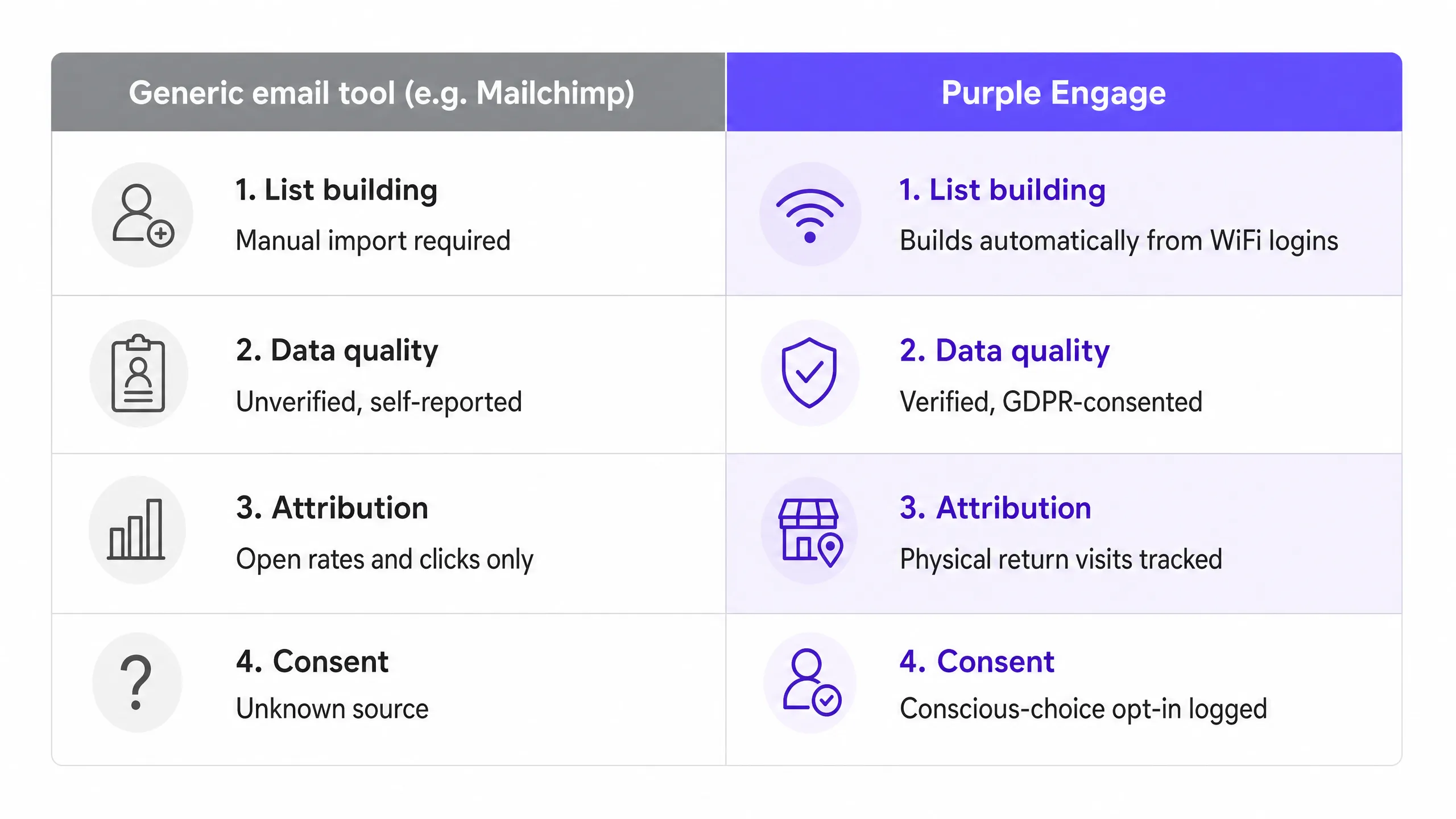
Generic email platforms measure success by open rates, click-through rates, and unsubscribes. These are useful hygiene metrics, but they do not tell you whether your marketing is driving revenue. A guest can open every email you send and never walk through your door again.
When your email list is built from WiFi logins, you gain a different measurement layer. Purple tracks the MAC address associated with each verified email. When a campaign recipient returns to the venue and connects to the network, Purple logs that event and links it back to the campaign. This gives you closed-loop attribution: the ability to see, for any given campaign, how many recipients physically returned to the venue within a defined window.
The metrics that matter for venue operators are revenue per send (total revenue attributed to a campaign divided by the number of emails sent), return visit rate (the percentage of campaign recipients who visited the venue within 30 days), and list growth rate (new verified opt-ins per week, per location). Purple surfaces all three in its reporting dashboard.
This approach also allows you to A/B test offers against real foot traffic rather than clicks. You can send two versions of a campaign to equal segments and measure which drove more physical visits - a level of attribution that no generic email tool can provide without a separate loyalty or POS integration.
Where to start
The following checklist covers the minimum steps to go from zero to a live, GDPR-compliant guest WiFi email capture program.
- Audit your hardware. Confirm your access points (Cisco Meraki, HPE Aruba, Ruckus, Juniper Mist, Ubiquiti UniFi, Cambium, Extreme, or Fortinet) support external captive portals and RADIUS authentication. If you are unsure, Purple's onboarding team can confirm compatibility.
- Define your data requirements. Decide which fields to include on the splash page. Start with email and first name. Add date of birth only if you will run birthday campaigns.
- Draft the value proposition. Write the incentive that will appear next to the marketing consent checkbox. Test two versions: a discount offer and a loyalty points offer. The higher opt-in rate wins.
- Build the automated flows. Set up the Welcome Email and the Lapsed Visitor campaign in Purple Engage before the portal goes live. Do not wait until after launch - you will miss the first wave of contacts.
- Launch at a single test venue. Monitor the opt-in rate and the email verification completion rate for 48 hours. Adjust the value proposition if the opt-in rate is below 25%. Once you are satisfied, deploy across all locations.